quinta-feira, 6 de agosto de 2020

You’hv got an IDoc !!

If you google IDoc, you would be flooded with thousands of pages. In this post, I have tried to compile only those part which are practically used in real time projects.
 
Sections for this page:
1. Difference between ALE and EDI ?
2. Definition and Components of IDoc.
3. IDoc types.
4. Basic steps to performed
5. Where the Idoc information is saved?
6. How to re-process the IDoc?
7. IDoc monitoring T-Codes
8. How to change the status of IDoc manually?
9. Statuses – OK/Warning/Error/Harmless?
[adToAppearHere]

1. What is difference between ALE and EDI ?
One SAP system (eg ECC) to another SAP system (eg SAP CRM/SRM/APO) =  ALE (Application Link Enabling)
SAP system to Non-SAP system (external third party system) = EDI (Electronic Data Interchange)
Updated 29th July 2019
We have over simplified the terms ALE and EDI which might confuse many. Our friends at LinkedIn provided better explanation to ALE and EDI.
ALE is not only for SAP to SAP.
EDI is not only for SAP to non-SAP.
Please read the below two paragraphs for better clarity.
Sitakant Tripathy

2 different trading partners both with SAP instances can still choose to do EDI to comply with EDIFACT and keep consistencies in sharing of business documents across multiple partners. Completely dependent on enterprise data distribution and industry compliance strategy.

Gurunathan Nandhi

ALE(Application Link Enabling) generally will be used in Application-to-Application (A2A) scenarios.

Target application can be SAP, Non-SAP and homegrown applications.
ALE need NOT adhere to any International Standard protocols/format such as EDI ANSI X11/X12, EDIFACT, and CIDX….
The exchanged data need NOT be System of Records either source or target systems.

EDI(Electronic Data Interchange) generally will be used in Business to Business (B2B) scenarios.
Business Partners: Vendors, Customers, Banks,…
Most of EDI cases where data need to adhere to International Standard protocols (EDI ANSI X12, EIDFACT…).
Assumptions: The exchanged data can be System of Records at either source or target systems or both.

End of Update – 07/29/2019

2. Definition and Components of IDoc:
An IDoc stands for ‘intermediate document’; it is a container for exchanging data between R/3, R/2 and non-SAP systems.
An Idoc type specifies the structure of the data.
A message type specifies the meaning of the data.
An IDoc type must be assigned to a Message type so that the data in the IDoc is processed correctly.
Note: An IDoc contains only character fields. 
PORT (WE21): Port, in the outbound process, determine the name of the EDI subsystem program, the directory path where the IDOC file will be created at the operating system level, the IDoc file names and the RFC destinations.RFC Destination (SM59): Used to define the characteristics of communication links to a remote system on which a functions needs to be executed.Partner Profile (WE20): Partner profile specifies the various components used in a process (Partner number, IDoc type, message type, Port, Process code), the mode in which it communicates with the subsystem (batch or immediate) and the person to be notified in case of errors.Message Control (NACE): Used in pricing, account determination, material determination, output determination etc. The message control component enables you to encapsulate business rules without having to write ABAP programs.
3. IDoc Types:
Based on IDoc Status
01 – 49 for Outbound Process
50 – 75 for Inbound Process                  idoc7
Based on direction of data flow
idoc1
4. Basic steps to performed:
On both sides
1. Define & Assign Logical System SALE (BD54)
2. Setup RFC destinations SM59
3. Port Destinations WE21
4. Partner Profile WE20
In Source system:                            In Destination System:
1. Segment Creation WE31                  1. First five steps in Source system
2. Basic Idoc Type Creation WE30       6. Creating/Leverage FM SE37
3. Message Type WE81                       7. Assign FM to Logical Message WE57
4. Assign Msg Type to Basic WE82       8. Define i/p method for Inbound FM BD51
5. Distribution Model BD64                 9. Create Process Code WE42
6. Message control NACE (optional)
7. Programs

Note: Points to remember in Partner Profile Configuration

idoc2

Trigger Immediately should be avoided.

To process the collected (Outbound) or background triggered IDoc (Inbound), these two batch Jobs needs to be scheduled at regular interval: RSEOUT00 and RBDAPP01 respectively

5. Where the Idoc information is saved?

Tables             Description
EDIDC             Stores the Control Record information an IDOC
EDID4             Stores the Data Records
EDIDD             Data Seg (EDI Intermediate doc)
EDIDS             Stores the Status of an IDOC
EDP13             Partner Profile: Outbound (technical parameters)
EDP21             Partner Profile: Inbound

6. How to re-process the IDoc?

Programs         Description 

RBDMANI2       Reprocess Idocs manually
RBDMANIN       Posting of IDocs with Status 51
RBDMOIND      Outbound Idocs status 03->12
RSEOUT00       For Processing 30 Status IDocs
RBDAPP01       For Processing 64 Status IDocs
RBDAGAIN       Reprocess Incorrect Outbound IDocs
RBDAGAI2        Reprocessing of IDocs after ALE Input Error

Note: Cannot remember the programs names !!!!

Just remember one program name for Inbound Idocs i.e. RBDINPUT.. easy.. huh!!!!
RBDINPUT : A menu with the different statuses possible for inbound IDocs

idoc3

7. IDoc monitoring T-Codes
Area Menu for Idocs                                                                   WEDI
Area Menu for Idoc                                                                     SALE
List Of All IDocs Created. (Default, Additional, EDI)          WE02
Selection Program For Issuing Output                                  WE15
Process All Selected IDocs                                                        WE14
Test Tool For Idoc Processing                                                   WE19
Select IDocs                                                                                 BD87
Idoc Search For Business Contents (Database)                 WE09
All process codes (inbound/outbound)                                WE64
IDoc documentation                                                                    WE60

8. How to change the status of IDoc manually?
Use SAP standard program RC1_IDOC_SET_STATUS. Please use judiciously!!

IDOC4

9. Statuses – OK/Warning/Error/Harmless?

IDOC5

IDoc6

If you need some other specific information, please leave us your query/comment. We would be happy to get back to you.

Check our other post on A to Z about Change Pointers.

Image source : www.appseconnect.com

Source: https://sapyard.com/youhv-got-an-idoc/

How to find Business Partner(BP) from Vendor and Customer in SAP S/4 HANA?
Introduction

After doing a full S/4 HANA Hybrid implementation of all the Fields this is a small and very important information I would love to share

In SAP S/4 HANA there are some major change in Simplification. Simplification means getting rid of Redundant Functionality. There will be a lot of Transaction Codes that has been completely Decommissioned hence it is very important to know from before so that you all do not invest time and energy in enhancing those Transaction Codes.. .
One major change that has happened is SAP Vendor and Customers are now called Business Partner.

The below blog will help you to do the following

  1. Determine Business Partner number when you know the Vendor number and vice versa.
  2. Determine Business Partner number when you know the Customer number and vice versa.

Solution

  1. Determine Business Partner number when you know the Vendor number and vice versa.

Login to SAP and GO to Transaction Code SE16–> Enter IBPSUPPLIER

Now Execute

Below is the relation between Vendor and Business Partner

Below is the Joining Condition. Please note down the Tables utilized.

Now Execute

Below is the relation between Customer and Business Partner

Below is the Joining Condition. Please note down the Tables utilized.


Conclusion

We can use this blog in any SAP S/4 HANA System.

Also check blog

https://blogs.sap.com/2020/07/16/how-to-know-all-the-sap-reports-associated-with-any-module-by-just-typing-sap1-you-must-be-kidding/


Below is the video version

Source: https://blogs.sap.com/2020/07/29/how-to-find-business-partnerbp-from-vendor-and-customer-in-sap-s-4-hana/

How to find which Transaction Codes was Deleted in SAP S/4 HANA compared to SAP ECC 6.0?

Introduction.

After doing a full S/4 HANA Hybrid implementation of all the Fields this is a small and very important information I would love to share

In SAP S/4 HANA there are some major change in Simplification. Simplification means getting rid of Redundant Functionality. There will be a lot of Transaction Codes that has been completely Decommissioned hence it is very important to know from before so that you all do not invest time and energy in enhancing those Transaction Codes.. .

Everyone at some point needs to move to SAP S/4 HANA. Now in SAP S/4 HANA some transaction code is no more available. How to find it?


Solution

How to find which Transaction Codes was Deleted in SAP S/4 HANA compared to SAP ECC 6.0?

SE38-->Enter Report PROFGEN_CORR_REPORT_2

Execute now

Enter the following parameter as above

Now the highlighted column(Old Transaction Code) has all the Transaction Code that has been Deleted in SAP S/4 HANA


Below is the video version. Enjoy:)


Conclusion

I hope the Audience would use this in there SAP S/4 HANA Journey.

 Source: https://blogs.sap.com/2020/07/15/how-to-find-which-transaction-codes-was-deleted-in-sap-s-4-hana-compared-to-sap-ecc-6.0/

How to know all the SAP Business Partner Transaction Code by Just Typing BUPT in SAP S/4 HANA? You must be kidding :)

Introduction

After working with SAP for more than 15 years and travelling across the Globe for SAP Projects. One issue I always use to have is how can I keep track of all the SAP Transaction Codes associated with any Module. If you are working as a SAP  Consultant you need to keep the name of Transaction Codes in your Fingertips. Sometimes you know from other Experts and sometimes you have to dig it out. After exploring I found a very easy way to dig out the SAP Business Partner Codes in SAP S/4 HANA. Just check this blog and never need to remember the Transaction Code for Standard SAP Business Partner

With SAP S/4 HANA Vendor and Customers are defined as Business Partner. The below tips help you know all the BP related Tcode,

Solution

Login to SAP and Type BUPT in Command Bar

Wala below you get all the Transaction Code related to SAP Business Partner Transaction Codes.

Conclusion

Please use this solution any where in SAP S/4 HANA

For video version check below link

Source: https://blogs.sap.com/2020/07/16/how-to-know-all-the-sap-reports-associated-with-any-module-by-just-typing-sap1-you-must-be-kidding/

How to make Error message appear as Pop Up without ABAP Coding? Really

Introduction

After working with SAP for more than 15 years and travelling across the Globe for SAP Projects one requirement I always use to get is to design a POP UP for a Custom Error SAP message. I was tired doing this until I figured out you can do this without any ABAP Coding and for every ERROR Message.

Solution

Please login to SAP and go to ME21N Tcode and before the Magic the error message shows in the bottom which may be not visible always

How we can change it to a Pop Up.

Go to Options by checking below screenshot

Select Notifications and Check Show error messages in a dialog box and Hit Apply and OK

After making this change you can get this new Pop Up.


Conclusion

You can use the above blog in SAP ECC as well as SAP S/4 HANA


For video version check below


Source: https://blogs.sap.com/2020/07/16/how-to-make-error-message-appear-as-pop-up-without-abap-coding-really/

How to Prevent the PO created against PR, but for higher quantity in SAP?

Introduction

After working with SAP for more than 15 years and travelling across the Globe for SAP Projects one enhancement I always use to build is to make sure the Buyer cannot buy more quantity than Released in the Purchase Requisition.

After sometime I got tired and said there should be an easier way to do it and guess there is a very easy way which will Cost the Customer nothing.


Problem

Purchase Requisition Approved amount.and PO Ordered Quantity

Solution

Go To Transaction Code OLME

Click as Mentioned Below

Now Click New Entries

Now Enter the following Entries and Save it.

Now we have only 15 Open quantity that can be used from the PR

Now we try to buy more than the Open Quantity available in the PR and Wala we got the Error. We did this without ABAP Coding.


Conclusion

In SAP there is always a better solution available if you have the urge to explore.


Here is the Video Version

Source: https://blogs.sap.com/2020/08/05/how-to-prevent-the-po-created-against-pr-but-for-higher-quantity-in-sap/

How to find CDS Views by just knowing the Field name in SAP ECC and SAP S/4 HANA?

Introduction

After we are slowly moving to the new era of SAP S/4 HANA CDS view is becoming very important. It is very important for all the SAP Consultant to know the available CDS view which they can use for Reporting. This blog will show how to find CDS Views based on a Field.

Solution

Create a ABAP Query  with the following Join Condition

Below is the Layout for the ABAP Query


Below is the Selection screen of the ABAP Query

Now suppose we wish to get the CDS View related to field KUNNR

Here is the below result


Conclusion

This blog you can use very effectively to find all CDS View.


For video version check below Link.


Source: https://blogs.sap.com/2020/07/17/how-to-find-cds-views-by-just-knowing-the-field-name-in-sap-ecc-and-sap-s-4-hana/

Dados Mestres do Produto no EWM

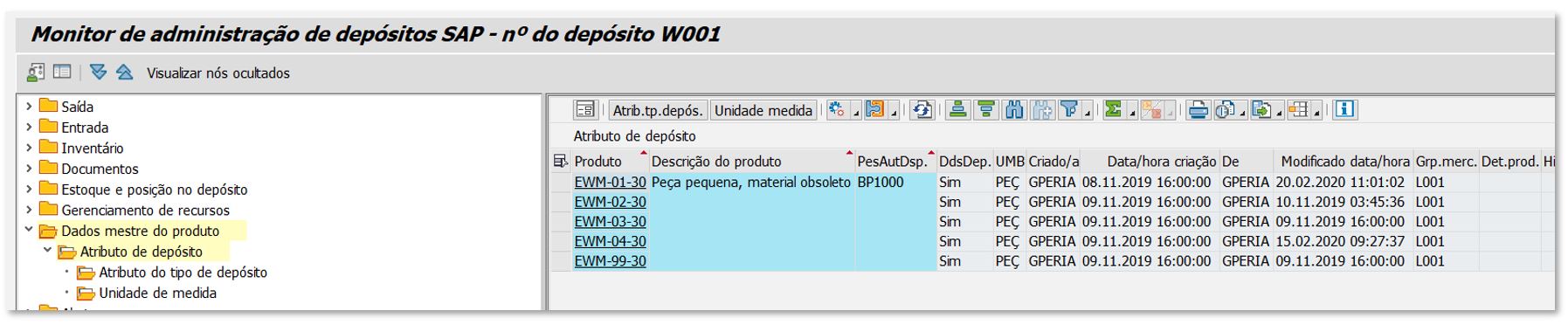
É muito comum termos a necessidade de um relatório de dados mestres do produto.

Uma transação muito conhecida por todos nós é a MM60, porém muito limitada.

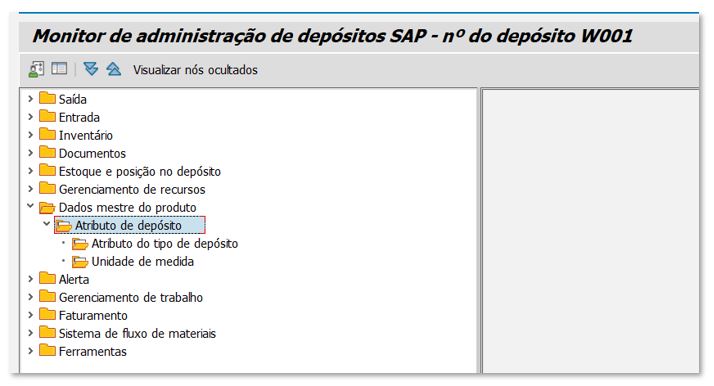
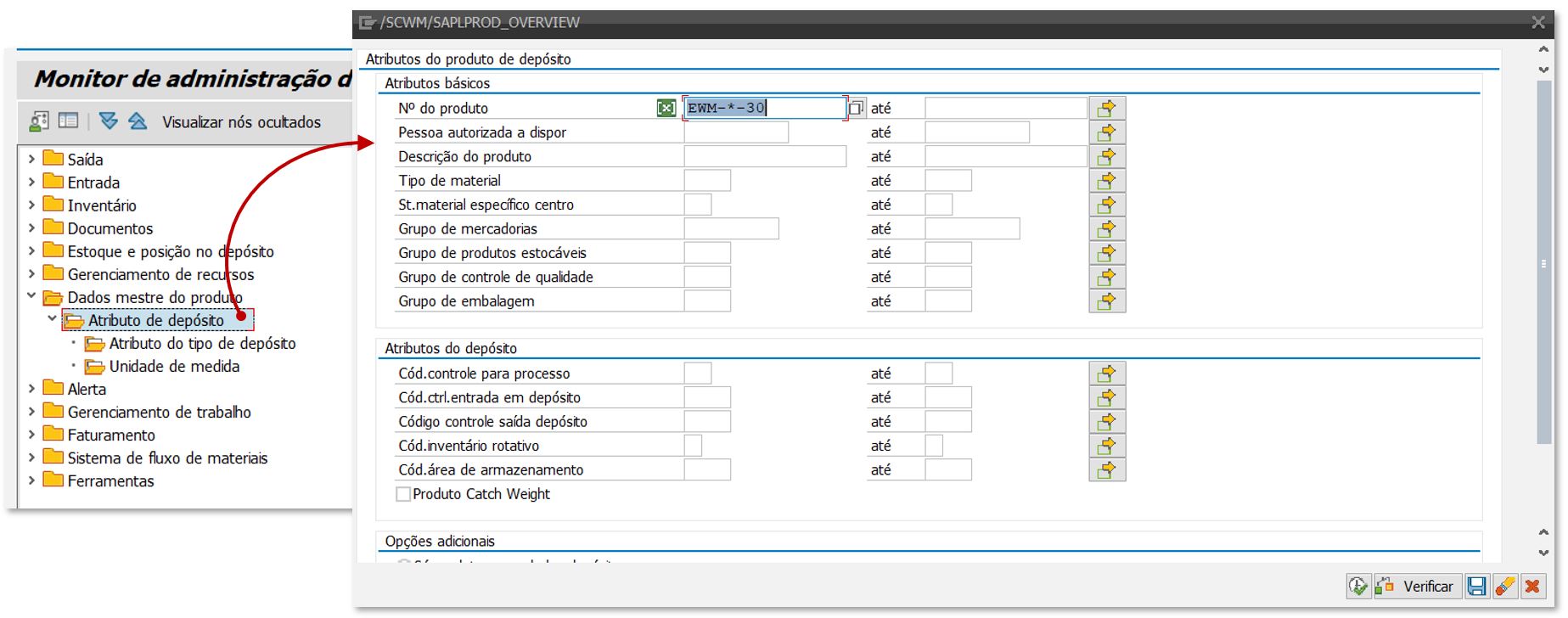
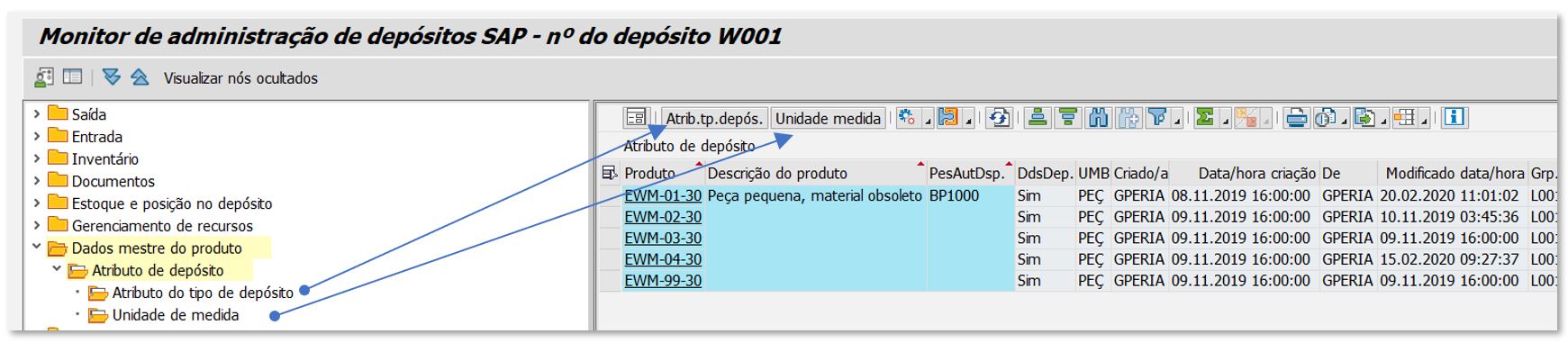
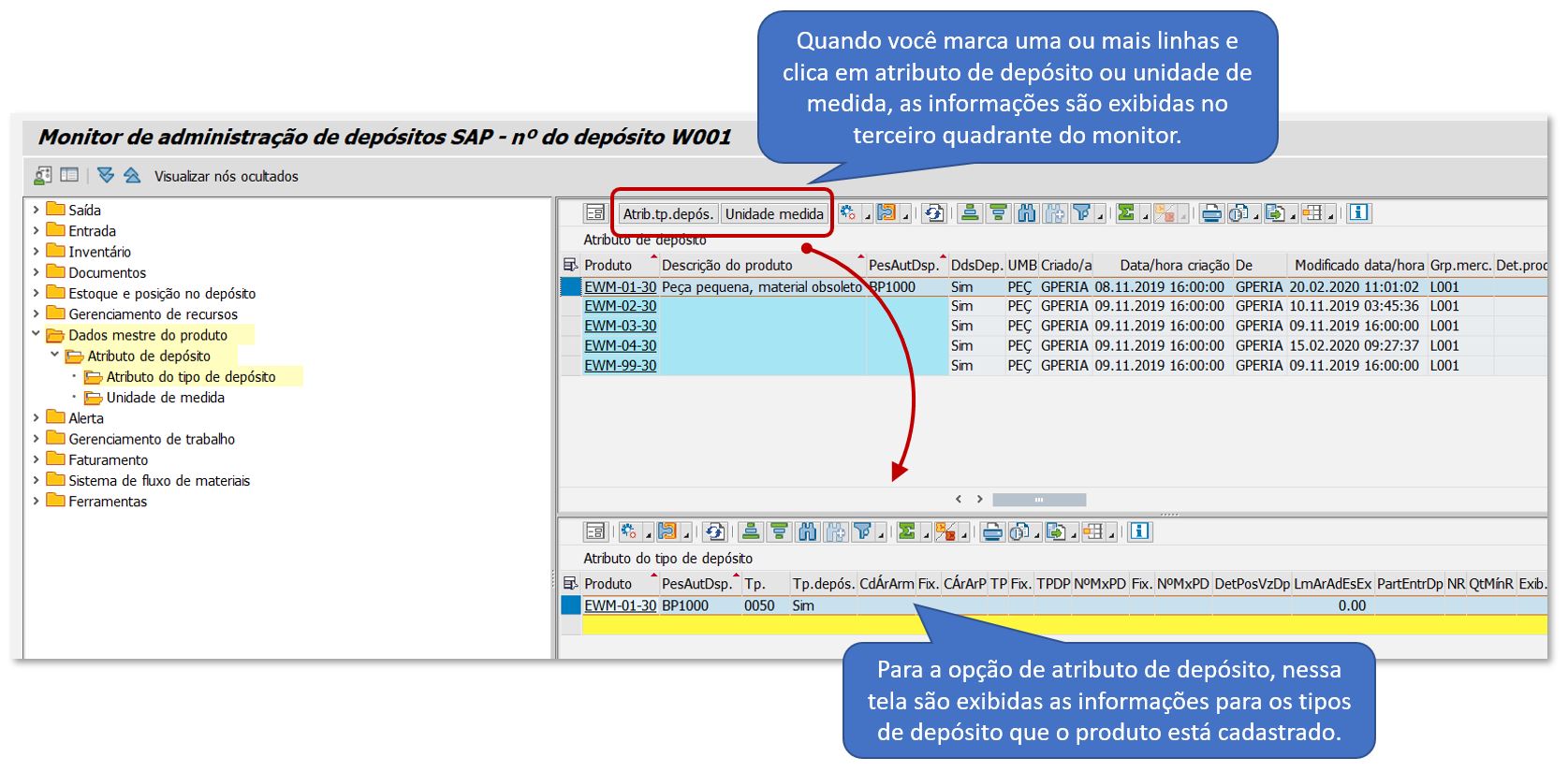
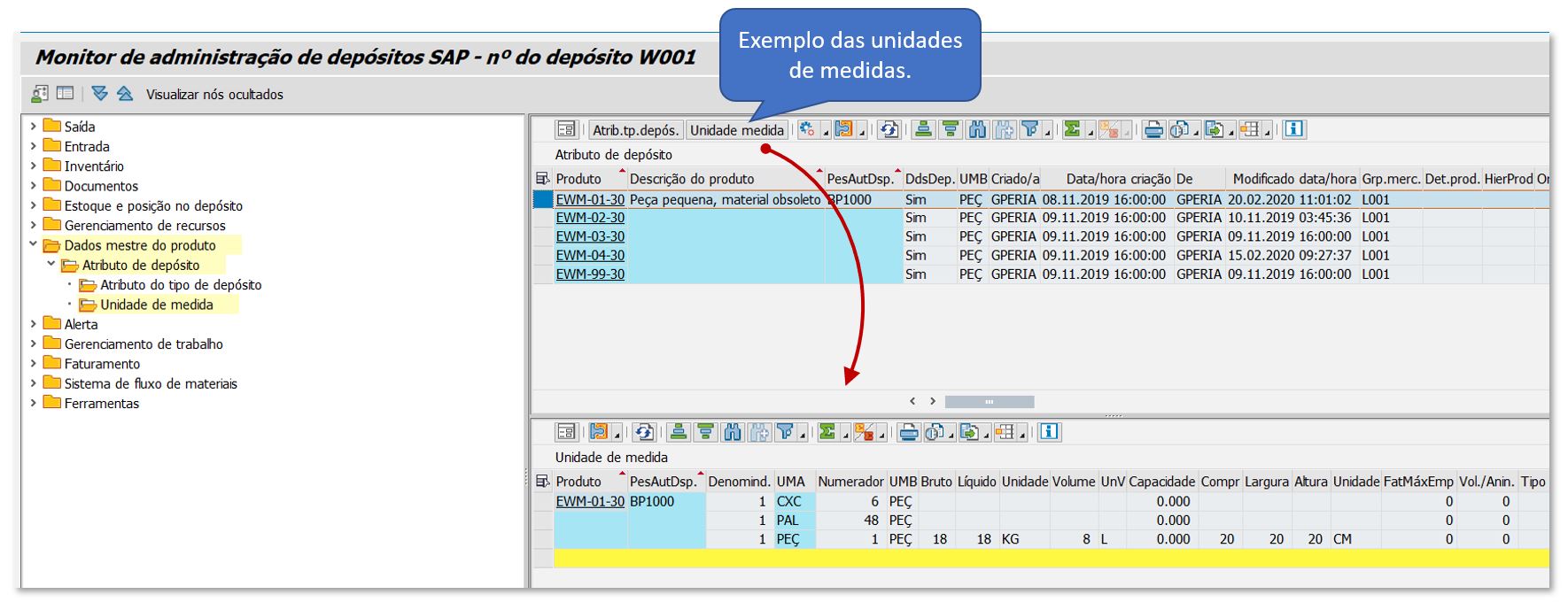
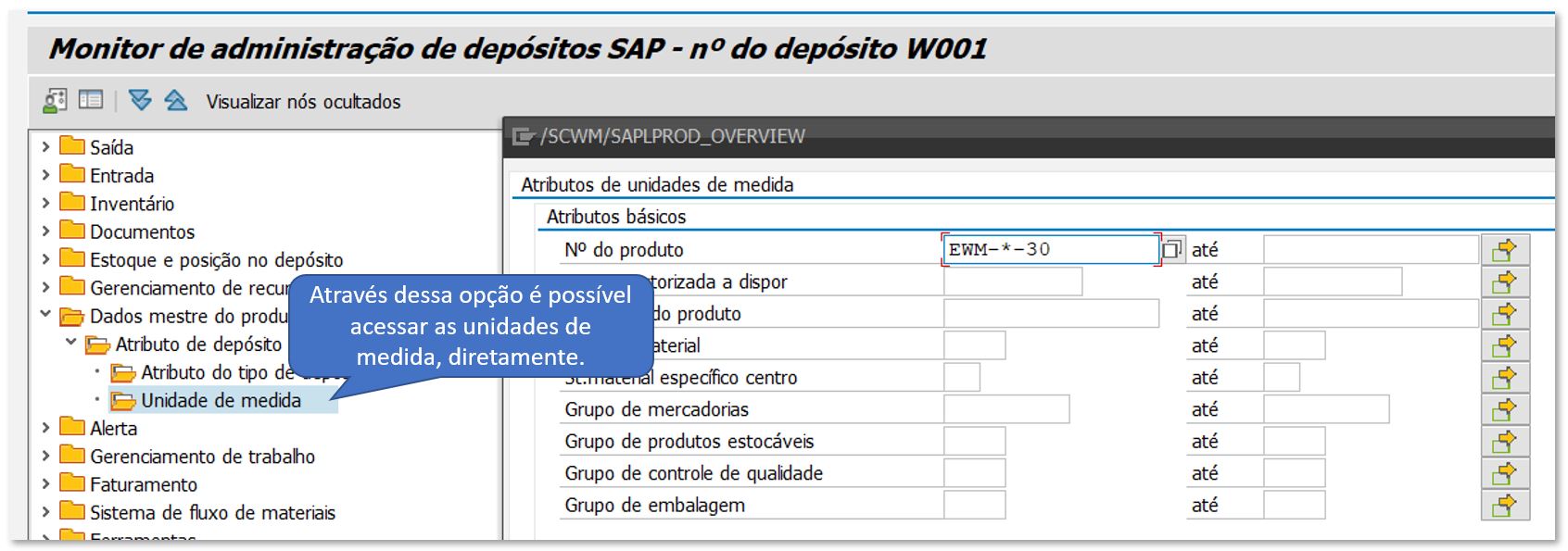
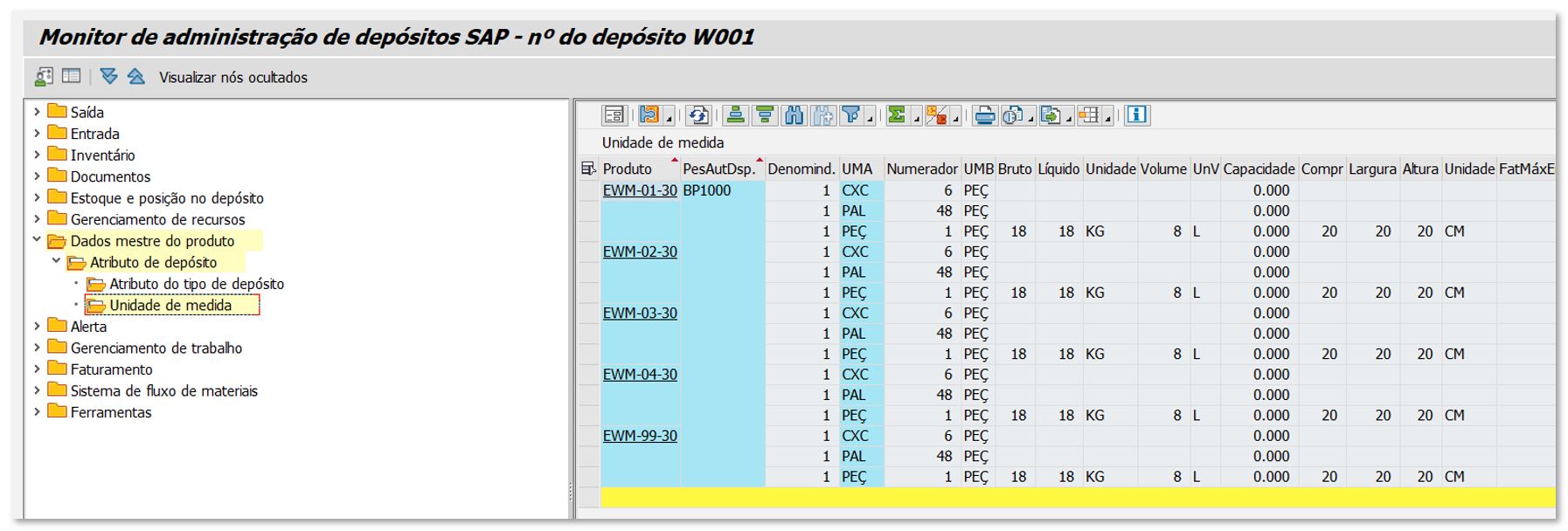
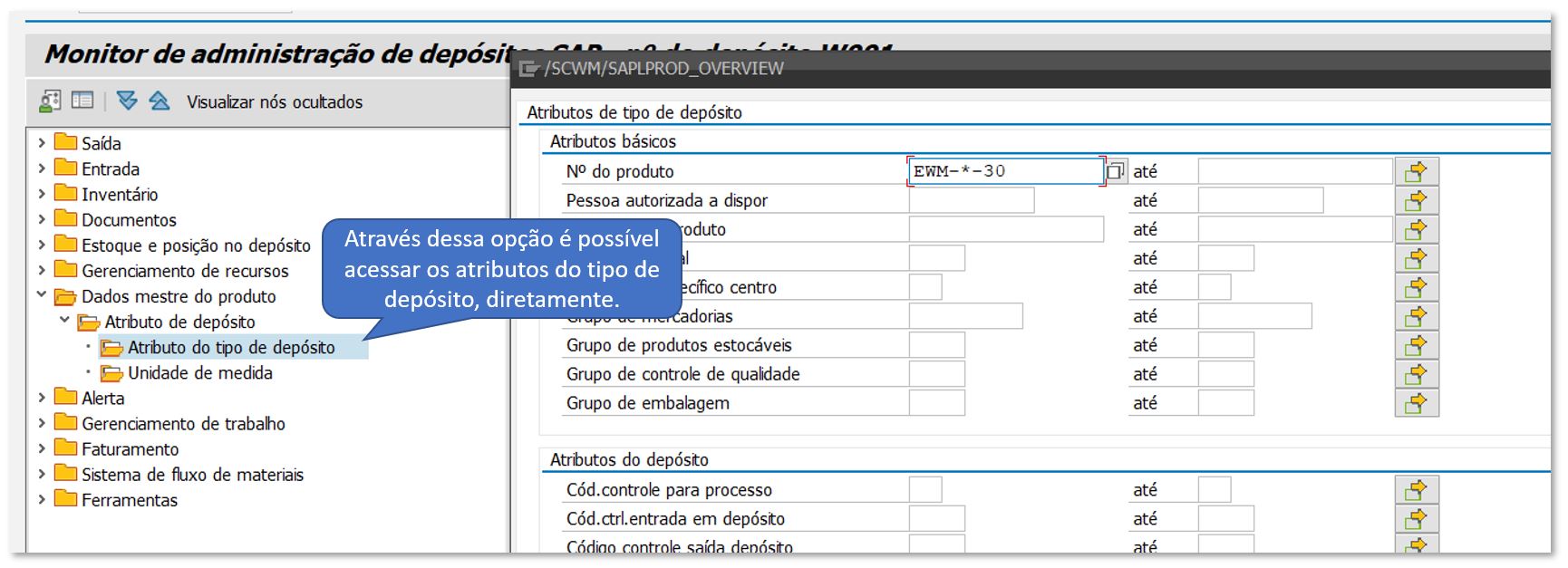
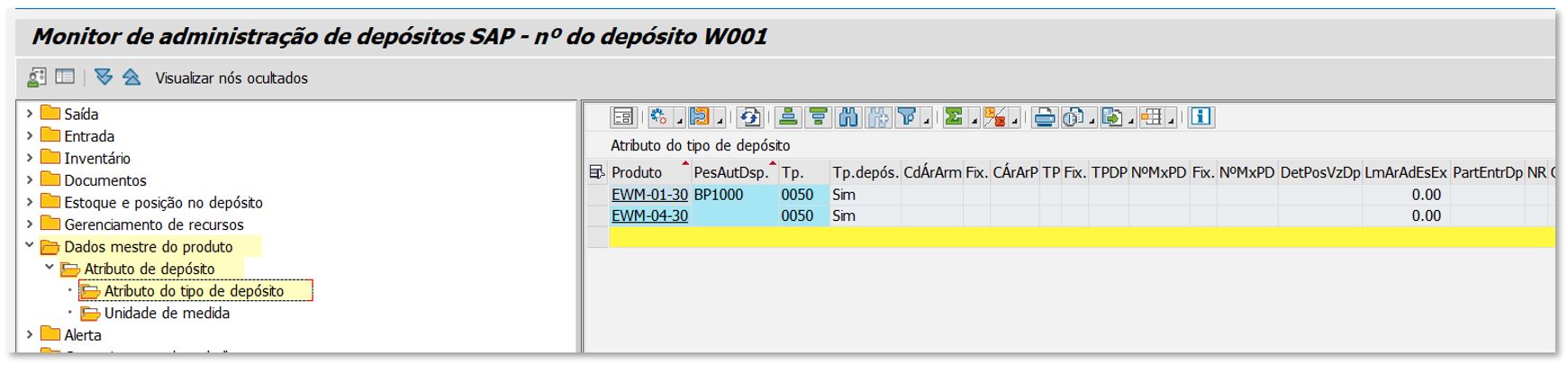
No EWM existe um relatório maravilhoso sobre os dados mestres do produto e está disponível no monitor.

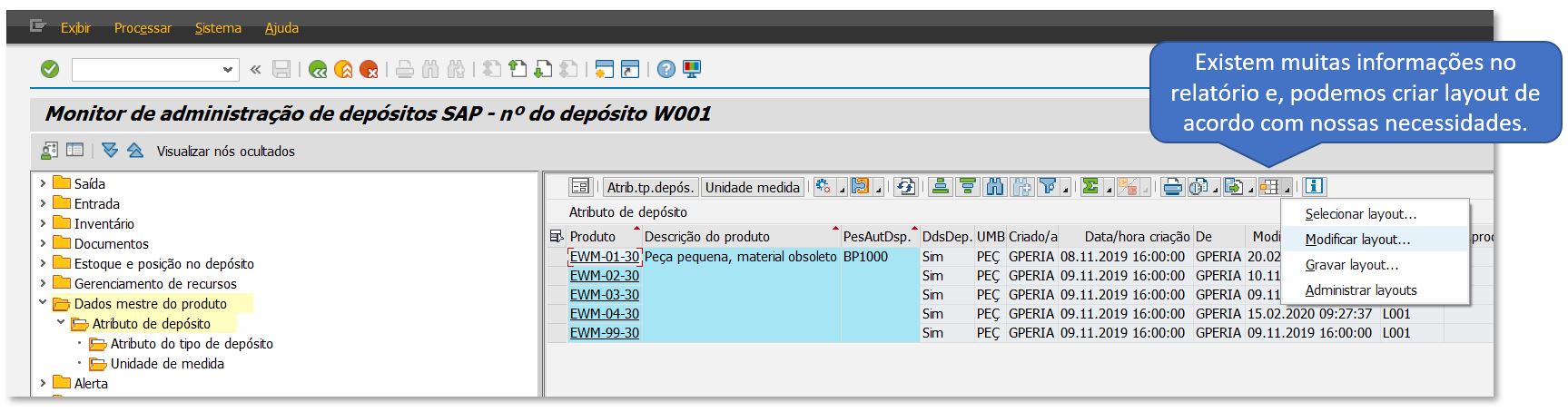
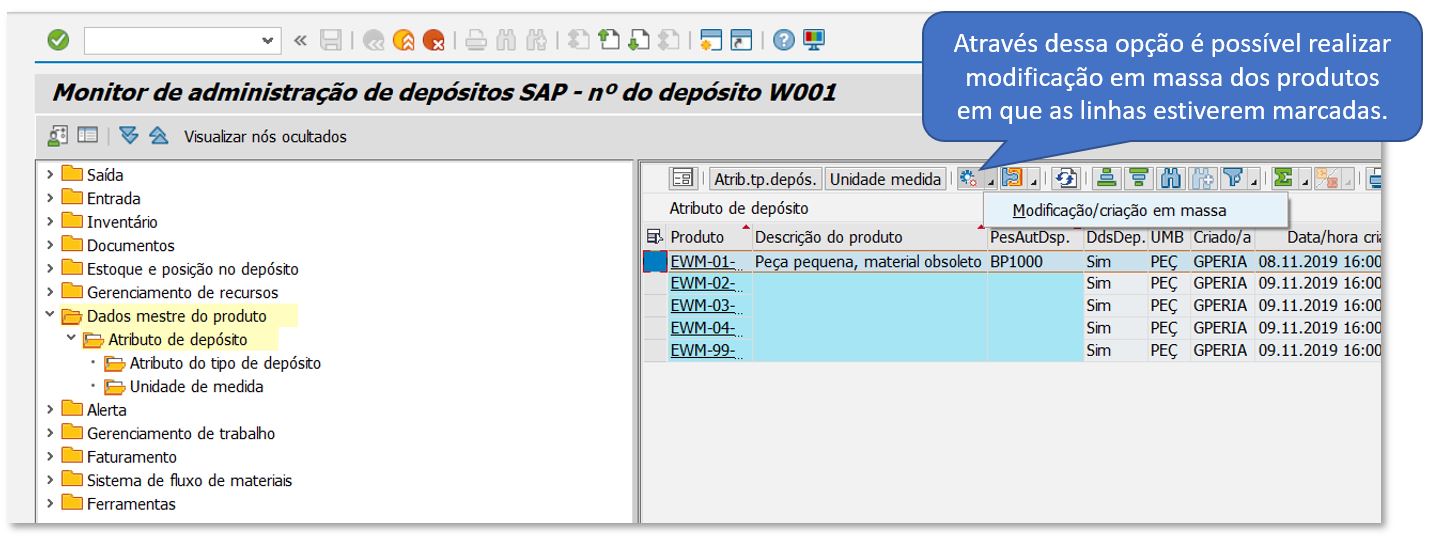
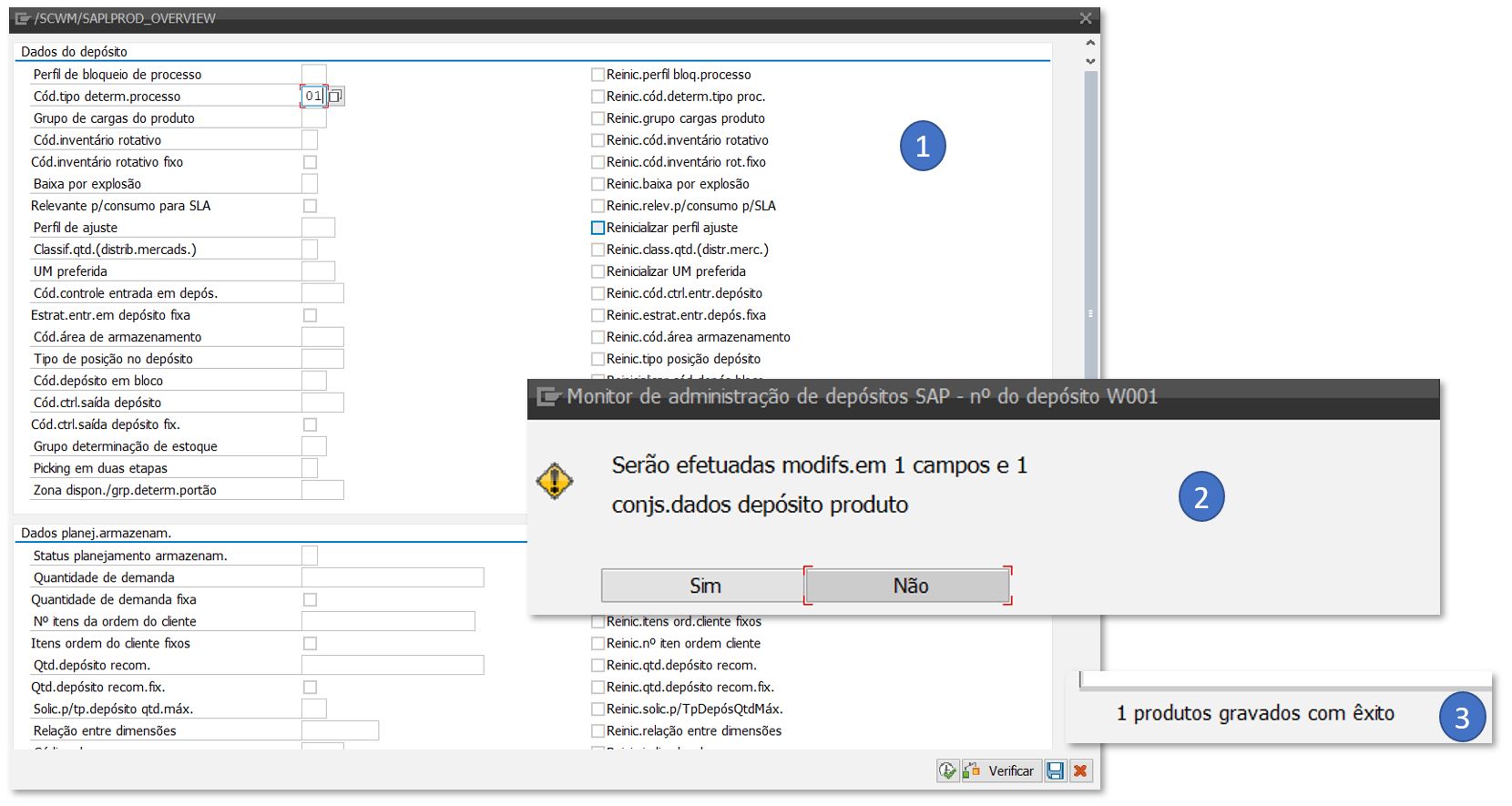
Através dele, também, é possível modificarmos os dados em massa. Isso é muito bom, pois a MM17 não está preparada para as tabelas do EWM.