quarta-feira, 17 de fevereiro de 2021

ERP SD Invoice Lists


Purpose

This article covers a simple example of Invoice List in SD-BIL area.

Overview

Invoice lists are mostly used to provide some benefits for payer when possible. Some benefits are the following:

  • To be able to consolidate/print several invoices into one.
  • Having billing date of invoices changed once it is consolidated. Customer may required submission of consolidated invoices by date.
  • Factory discount is applicable.


It is also benefitial to the seller while organizing the billing documents a invoices are grouped into one invoice list. It simplifies the control once there is only one payment which means that accounting document of invoice list takes place of all its invoices' account documents.

Depending on the payer's country the payer may pay tax for the discount provided. The condition type for factory discount is RL00 while its tax is MW15 (optional).

Settings

There are some settings before creating Invoice List, here they are:

  1. In Billing Document Types make sure that Invoice List Type (LR) is assigned to the invoice to group (E.g: F2).
  2. Make sure that copy control make use of requirement 016 from F2 to LR ( VTFF transaction ).
  3. Set a calendar for Invoicing List Dates ( XD00 transaction ) to the related customer/payer.


       4.      Set RL00 (statistical) in the pricing procedure, for example:


       5.       Set condition record for RL00 ( VK11 transaction ).

You may want to set also in pricing procedure the tax MW15 (optional) and also to determine LR00 (invoice list header) to create printing papers output automatically.


Invoice List Creation Steps

It is simple flow of SD transactions before creating Invoice List (transaction VF21), like VA01, VL01N and VF01.

  1. Create more than one sales order for a same payer.
  2. Creates respective delivery orders.
  3. Create respectives invoices.
  4. Now you create the invoice list (VF21).


       5.     Hit Execute button and check discount as per defined in condition records:


    After hit save buttong notice that when you release the invoice list to account then accounting document has the final data.


          6.       Setting Output Type:


Standard program for LR00 will print the invoice list with each invoice data per page.

Related Content

Related Documents

http://help.sap.com/saphelp_46c/helpdata/en/dd/561102545a11d1a7020000e829fd11/content.htm

http://help.sap.com/saphelp_470/helpdata/en/dd/561129545a11d1a7020000e829fd11/content.htm

Related SAP Notes/KBAs

Insert links to any related SAP Notes/KBAs that support your topic or are related. Please hyperlink ONLY SAP Note or KBA number.
Example:

SAP note 9150: Cancellation of a Invoice List

SAP note 943390: Header Texts in invoice list are unavailable

SAP KBA 1721692: Cancelled/Cancellation invoice is present in VF24

SAP note 11162: Invoice split criteria in billing document


Source: https://wiki.scn.sap.com/wiki/display/SD/ERP+SD+Invoice+Lists

Statistical sales condition in Account Based COPA

 As mentioned in my previous post about Finance in S/4HANA 1809 I mentioned the release of statistical sales conditions in Account Based COPA. As many of you probably know, reporting on statistical conditions was one of the final gaps between costing based and account based COPA. With release 1809 this functionality is included, making account based COPA even better.

No alt text provided for this image

Configuration Steps

First of all, the extension ledger and the ledger group to post the statistical values should be configured first.

No alt text provided for this image

Activating processing of statistical conditions:

No alt text provided for this image

Configure statistical sales condition in the pricing procedure. Make sure to check the statistical and relevant for accounting indicators:

No alt text provided for this image

Assign an account key and configure the account determination in VKOA:

No alt text provided for this image

Now you should be ready to work with statistical sales conditions in accounting. Keep in mind that the posting is done only during invoicing. 

Creating and invoicing Sales Order with statistical condition

No alt text provided for this image

Posting during Goods Issue. Nothing unusual.

No alt text provided for this image

Posting during Invoicing. You notice a second accounting document posted on Extension Ledger 0C.

No alt text provided for this image

This is the provision posting for warranty costs coming from the statistical sales condition.

No alt text provided for this image

Usual revenue posting on the leading ledger:

No alt text provided for this image

Overview of the accounting entries:

No alt text provided for this image

Key takeaways

  • Statistical condition values are posted during invoicing. If you also have accounting entries for incoming sales order active (read here in my previous blog), you wont see the statistical condition values until you post the invoice.
  • Entries are statistical, they will only show up in reports and apps if you select the appendix ledger.
  • The provision side of the posting (balance sheet) will carry the material as dimension but not the sales order (see printscreen of Sales Order – Actuals App)

I think the addition of this functionality to account based profitability analysis is a reveal for customers who cannot switch completely to account based profitability analysis, because they are working with statistical conditions in sales and report on those in COPA reports.

Source:https://www.linkedin.com/pulse/statistical-sales-condition-account-based-copa-ugur-hasdemir/

segunda-feira, 15 de fevereiro de 2021

What-If Analysis of Quality Inspection before Deconsolidation in Inbound POSC

 We, as a functional consultant, often follow SAP footprints to replicate any business process whose some steps are pre-configured in default plants or warehouse (0001). In the same direction, if 0001 SAP warehouse is looked upon, for Inbound storage control, INB1 Quality Inspection Step( QIS) is prior to Deconsolidation( IB02). 

Well, this may not sound very good and some of you may not agree that there is no meaning of QI before decon, this blog is written to explore why SAP gave this sequence and what are the business requirements to configure QI before decon during Inbound process in POSC.

Below diagram has 2 process.

  1. One HU with product A, inspection lot generated in QI Work centre by performing implicit GR from Staging area to QI WT through HU WT. This HU after QI usage decision and HU closure, will move to Decon station, where Big HU will be deconsolidated into smaller boxes by allowing HU type check for destination Bin. After Decon, Hus will be putawayed.

2.  This is more complex. 1 HU has partial good quantity and partial faulty quantity. My idea is to repack partially good and partially rejected quantities into 2 separate HU at QI station only. The partially accepted lot should divert to decon because of specific HU type check for final bin.

The rejected HU should directly diverted to Scrap area without going for any decon step.


Deconsolidation always doesn’t mean a mixed HU, even with 1 Product( or batch), HU can be relevant to deconsolidation based on characteristics of packaging material, technically, I am taking of HU type Group( HU types). In this regard, it makes sense to perform QI prior to decon, and latter product can be deconsolidated with compatible HU types to send it to final bin.

SAP POSC sequence:

QI(QIS) before Decon( IB02)


Process 1). My POSC steps are

  1. Quality Inspection, ZQIS
  2. Deconsolidation, IB02
  3. Put way, IB03


Inbound delivery packed into HU. Perform Implicit GR, if you directly perform GR at staging area, External Step QIS will not be wired to HU and it triggers an error when HU is closed in QI station, Try that:)


After performing implicit GR and WT confirmation, HU is moved from staging area to QI 8020 QI work center and External step ZQIS is wired into HU.

Note- SAP has given to 2 different variants to perform QI with explicit GR either at Door or at staging area OR implicit GR moving HU to work center and do inspection at WC bin. This process fails if you follow variant-I. External steps QIS only gets wired into HU if implicit GR is performed.


Performing UD at WC. 

QA11 or /SCWM/QINSP_S4

This is the most unpredictable screen of EWM QM integration, this has many flaws. Sometime after UD, if we forget to close the HU, we are gone. System doesn’t allow to close HU if we forget to close after UD( in 1709, not sure if this is fixed in recent release)

So brain has to put focus 2 things, take UD and close HU and save. If I am an end user, how painful it could be to perform these steps, I wish SAP will make this more business and user friendly.


Once HU is closed, Decon and Final tasks are open:)

Now, I get 2 task.

  • One HU WT for decon where I can break large HU into multiple HUs based on my Decon condition record 0DKS with HU types.


  • Final Task in WATING. Once Decon HU are closed, final task will be open.


Finally we achieved the first process and this proves Quality inspection before Deconsolidation is very much possible and in consonance  with SAP 0001 Warehouse design.


Process 2: Break the Pallet into 2 HUs at QI station, conduct UD, divert 1 good HU to Decon station and 1 faulty HU to Scrap Zone.

When I conceptualized to move in direction of process 2, I had no idea whether this will work or what results I will get, but still I dared to test this.


Since from 1709, partial inspection of HU is very much possible, this reinforced to perform partial UDs on 2 different HUS. My idea is to create 2 different HUS at QI station only.

With one HU of 40 Units, created 2 HUs at QI station and performed Partial UD on these new HUS.


  1. The rejected HU moved to scrap location B5.


  • However, the accepted HU is stopped at QI Bin, HU 7001000159. No warehouse task is created for destination HU. Ideally, system had to create a WT from QI station to Decon Bin.


Remedy: Looks this is a gap in system and it is required to implement SAP note.

2938250 – ‘Close HU’ after Inspection doesn’t trigger follow up WT for storage process

This note talks about if there are QI, decon and Putaway steps and Usage decision is made at QI work with creation of destination HU at QI station only, system does not create the WT for destination HU. So this note is mandatory for next step.


Hence, with all the testing, it is quite clear that QI before deconsolidation is very much a possible scenario and can be mapped.


EWM architecture and Programming book by SAP press too endorses the ”QI to be inserted before Decon.

Book quotes: Deconsolidation may happen at any time in the process. It makes sense prior to ‘QI” if sampling is used to  separate the samples from rest of the stock and only brings the samples to the inspection work center.( Page no 84).


Hope you liked the blog, I would highly value any comments or correction to make this blog more productive.


All testing is performed S/4 HANA 1709.

regards

Shailesh Mishra

Source: https://blogs.sap.com/2021/02/11/what-if-analysis-of-quality-inspection-before-deconsolidation-in-inbound-posc/

SAP aATP in S/4HANA 2020 Release


Capability of Partial confirmation for Plant substitution in Advanced Available-to-promise in S/4HANA 2020 Release

Advanced available-to-promise (aATP) is being developed from scratch in SAP S/4HANA and will be a successor to Global ATP (GATP) of Advanced planning & optimization (APO). aATP was initially introduced in S/4HANA in the 1610 release and is evolving in every release of S/4HANA.

APO GATP has a functionality of ‘Plant substitution’ i.e. if the material is not available in the Sales Order plant, then the availability check is automatically carried out in other plants. APO GATP requires the ‘Substitution rule’ to be set up e.g. if the material X is not available in plant A, then it is set up in substitution rule to check the plant B or C. So, APO GATP requires a pre-determined rule to determine the alternative plants. However, aATP does not require any such ‘Substitution rule.

aATP’s algorithm is dynamic and intelligent – it automatically checks all the plants of the sales organisation of the sales order. Until the 1909 release, aATP forces the original plant to be changed to a new plant as described in my earlier blog. If multiple plants are able to confirm the availability of the material, then aATP also provides ‘Tie Breaker’ logic to determine the most appropriate plant. This is described in my blog post here.

There are several new features and innovations for aATP in S/4HANA 2020 (released in October 2020). This blog post will discuss the enhancements and new features of ‘Plant substitution,’ also known as ‘Alternative-based-confirmation (ABC)’ in aATP of S/4HANA 2020 release.

• Partial confirmations with multiple plants as Sub-item in Sales order

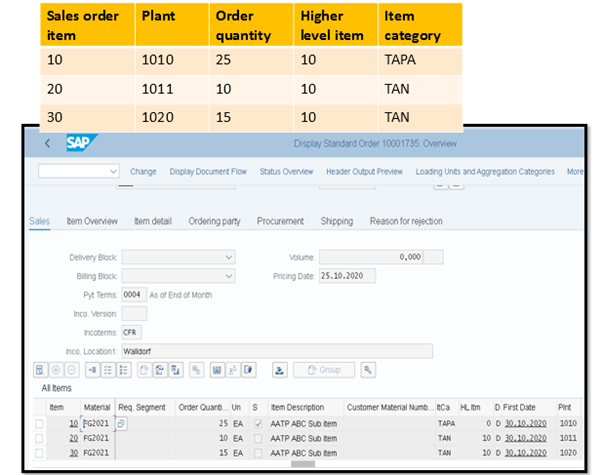
Enabling confirmations with multiple delivering plants is one of the most desired requirements for many customers, and the same is now possible with ABC in the S/4HANA 2020 release. The below image depicts a scenario in which the sales order has been created with original delivering plant as 1010 with order quantity of 25 EA. The system has proposed the material to be delivered from two plants 1011 and 1020 with confirmed quantity of 15 EA and 10 EA respectively. Material FG2021 is not available in plant 1010 and hence why the system has proposed the material to be delivered from 2 different plants 1011 & 1020 as sub-items of the original (higher level) sales order line item.


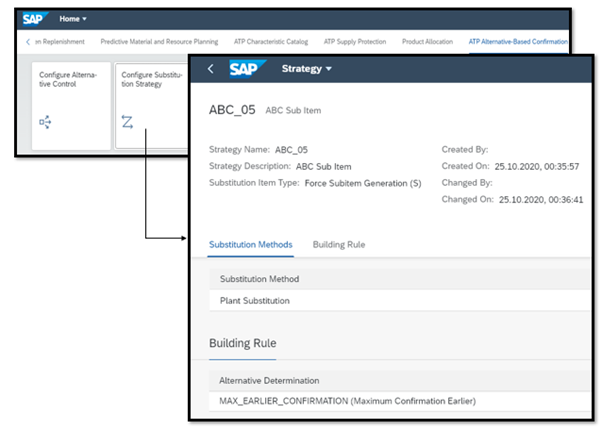
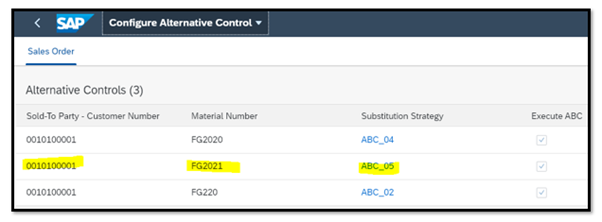
Set up for aATP is mostly done through Fiori apps and is much simpler compared to APO-GATP. Settings for the above scenario are shown in the below image. A Substitution strategy ABC_05 is defined to ‘Force Sub-item generation’ for ‘Plant substitution’ in Fiori app ‘Configure Substitution strategy’ and the same strategy ABC_05 is assigned for the Sold to party or customer 0010100001 and material FG2021 through Fiori app ‘ Configure alternative control’.

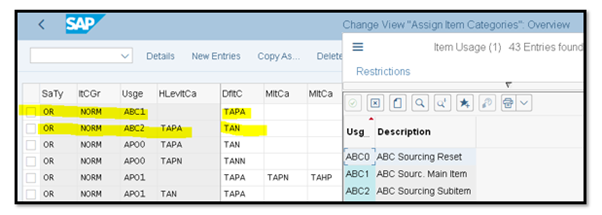
Apart from the above Fiori set up, following assignments (as highlighted) for item categories need to be done for the creation of Sub-item in sales order in customising table T184 or IMG menu path IMG->Sales and distribution->Sales->Sales document item->Assign item categories.

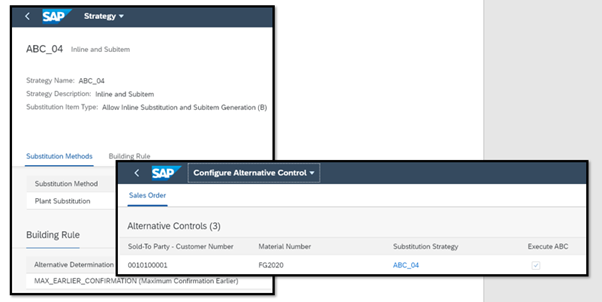
SAP has also provided the option of Mixed ‘Substitution strategy’ allowing ‘Allow Inline Substitution and Subitem Generation’ as in ABC_04 as depicted in the below image.

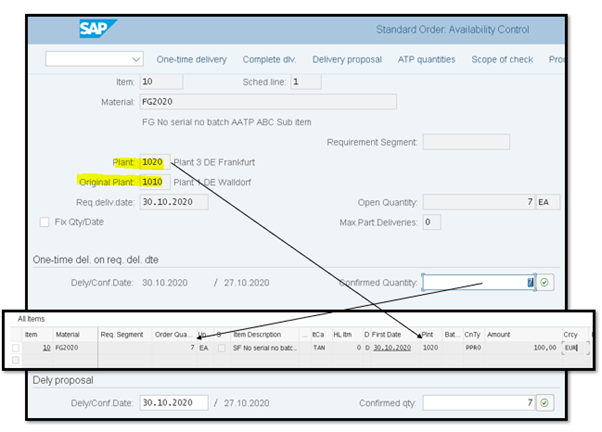
With this strategy, if an alternative plant can fulfil the entire order quantity, then the system does ‘Inline substitution’ i.e replaces the original delivering plant of the sales order to an alternative plant without creating any sub-item. The below image shows that the original delivering plant 1010 has been replaced by alternative plant 1020 (as Inline substitution) without creating any sub-item in sales order as the plant 1020 has fulfilled the entire order quantity 7 EA.

• Use of Custom and additional standard fields to define alternative control

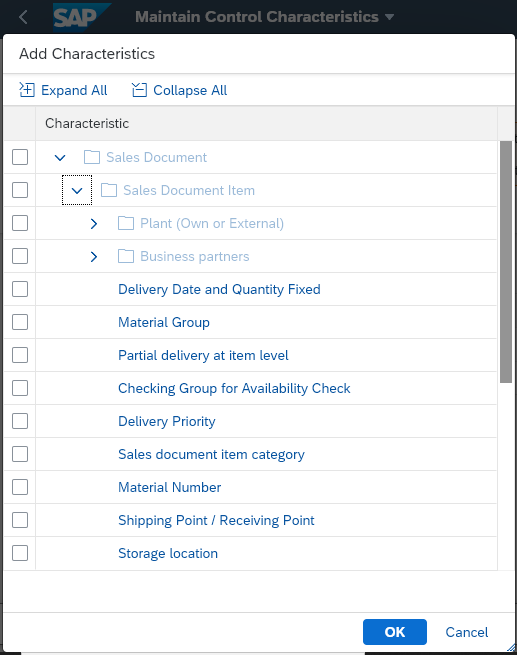
Custom and additional standard fields can now be defined in characteristic catalogue for Alternative control as shown in below image. These extra fields will increase individualisation capabilities for the activation of ABC to suit business requirements.

These new features/enhancements will enable increased and automated confirmation capabilities from multiple plants to fulfil a customer requirement and to improve customer satisfaction.

SAP is also expected to release ‘Material substitution’ in S/4HANA 2021 release e.g. suppose a customer wants a black iPhone 12 64GB. If it is not available then the system will be able to propose a black iPhone 12 with 128GB or an iPhone 12 64GB in white, etc.

aATP is becoming one of the most mighty and intelligent tools in the SAP ecosystem.

Author: Mrinal Kanti Roy

Stay tuned for more insights on Eursap’s Blog

Please also check out Eursap’s weekly SAP Tips!

Need to hire SAP Consultants?

Get in touch with Eursap – Europe’s Specialist SAP Recruitment Agency

Source: https://eursap.eu/2021/02/10/blog-capability-of-partial-confirmation-for-plant-substitution-in-aatp-in-s-4hana-2020-release/