domingo, 12 de dezembro de 2021

Carrier updates and Event reporting from Logistics business network (LBN) to freight order in Transportation management ( TM ) of S/4HANA

 Logistics Business Network (LBN) as described in my earlier blogpost https://blogs.sap.com/2021/08/27/freight-collaboration-with-sap-logistics-business-network-lbn-and-its-integration-with-sap-transportation-management-tm/ is becoming popular with customers because of its rich functionalities with Track & trace , Event reporting etc. Recently, I did a Proof of Concept (PoC) with Carrier updates and Event reporting from LBN to Freight order in Transportation Management ( TM ) of S/4HANA for an Electronic goods manufacturing company and thought to share my learning & experience in this blogpost.

The high level requirement has been described in below Image. Freight order is sent to the carrier for Confirmation by carrier  (1) . Carrier should then check the details of the transport in the freight order and update the information with Truck (vehicle) number & the name of the Driver and those information are to be updated to the freight order (2). Freight order then subsequently becomes ready for reporting in LBN by the carrier. Standard events like Delay, Exception, Proof of pick up (or delivery) etc can be reported by the carrier through LBN Portal. The customer wanted that if there is any delay in either Pick up or delivery by the carrier for t5hat freight order , then that should be reported to the freight order (3) and an email should be triggered to the concerned person (4) stating the reason for the delay.

The above flow has been illustrated with relevant screenshots from TM on S/4HANA and LBN in below images.

(1) A XML message is triggered in freight order in TM on S/4HANA to LBN on ‘Sent to Carrier’ from the freight order and the same freight order appears in LBN for ‘Confirm’ or ‘Reject’ by the carrier as in below image.

(2) Carrier confirms the freight order with App ‘Freight orders for Confirmation’ and updates with License plate & the name of the driver and these information are updated in freight order in TM on S/4HANA as in below image.

(3) Once the freight order is confirmed, then the freight order appears in App ‘Freight orders for reporting’ in LBN. In case of any delay in pick up , Carrier updates the freight order with LBN app ‘Freight orders for reporting’ that there will be ‘Delay’ in Pick up of the transport due to ‘Heavy snow fall’ and the same is updated in freight order as in below image.

(4) An email is triggered to the concerned person/s with the reason for the delay as displayed in SOST and as shown in below image.

Many customers will be looking for this functionality for the required collaboration with carrier and Transportation manager .This is just one of the several scenarios that can be modelled with LBN with TM . It appears from the demands from several customers that LBN is becoming one of the proven applications for collaboration, event reporting with carriers etc for complex logistic execution scenarios.

This blogpost is based on my tests , observations and insights with LBN and TM in S/4HANA. Will appreciate your feedback and comments.

 Source: https://blogs.sap.com/2021/12/07/carrier-updates-and-event-reporting-from-logistics-business-network-lbn-to-freight-order-in-transportation-management-tm-of-s-4hana/

Early Updates’ with packing information in TM – EWM Integration with EWM Transportation unit in S/4HANA 2021 Release

 Many customers with SAP Transportation management ( TM ) and Extended warehouse Management (EWM) use TM – EWM integration with Transportation unit (TU) in EWM with functionalities as described in my earlier blogs like https://blogs.sap.com/2018/03/14/direct-integration-between-embedded-ewm-tm-in-s4hana-improving-overall-efficiency-of-suply-chain/ , https://blogs.sap.com/2020/05/09/dock-appointment-scheduling-das-in-embedded-extended-warehouse-management-ewm-integrated-with-embedded-transportation-management-tm-in-s-4hana/ etc. SAP’s TM – EWM integration eliminates the time consuming and error prone manual co-ordination work between Transportation Planner and Warehouse Manager.

In this TM – EWM with EWM TU flow (till S/4HANA 2020 release), the Packing information (like number of packing boxes, weight & volume of those boxes etc) are transferred to ERP (ECC or S/4HANA) and TM only after Goods issue or departure of truck in EWM as depicted in below image. Packing information is transferred from

  • EWM to TM at ‘Departure from checkpoint’ on TU in EWM and
  • EWM to ERP at ‘Goods issue’ on outbound delivery in EWM

which are quite late in supply chain execution process.

These packing information are essential for transportation planning, estimation of freight costs etc and hence most the customers prefer the packing information to be available in ERP and TM prior to Goods issue  and these information are extremely critical for customers with

  • Material master data not very right (from the perspective of its weight, volume etc)
  • Assembling multiple products to a finished product

Many customers have enhanced standard SAP solution with BADIs’ etc so that these packing information are transferred to ERP and TM from EWM just after packing (i.e before goods issue) in EWM. SAP has now eliminated this limitation in their standard solution. S/4HANA 2021 release now provides the option for ‘Early Updates’ to transfer the packing information at ‘Loading finish’ (i.e prior to goods issue) on transportation unit in EWM as depicted in below image.

Below image shows that the Loading is completed and goods issue has NOT yet been posted for EWM TU 6100002784.

Note that the loading is completed at 17:02:03 in the above image and a PPF action (which also triggers an LDAP to TM) has been triggered at 17:02:06 on EWM TU as in below image.


Freight order in TM also gets updated with ‘Loading end’ with the same timestamp (of ‘Loading completed’ in transportation unit of EWM) as in below image.

EWM has also updated the packing information (number , identification , type of packing box or Handling Unit etc) in freight order of TM as in below image.

Packing information also gets transferred to ERP delivery with the PPF triggered on outbound delivery in EWM as in below image. Note also that the Goods issue is NOT posted in the document flow in ERP delivery.

Most of the customers were looking for these ‘Early updates’ of packing information in their TM-EWM integration and will benefit from this solution with better transportation planning and supply chain execution.

This ‘Early updates’ is a part of S/4HANA 2021 release and SAP has also provided the option to activate this solution to the customers on S/4HANA 2020 release as stated in SAP note 3105684.

This blog is based on my personal tests, observations, insights in S/4HANA 2021 release with embedded TM and EWM. Will appreciate your feedback / comments.

 Source: https://blogs.sap.com/2021/12/10/early-updates-with-packing-information-in-tm-ewm-integration-with-ewm-transportation-unit-in-s-4hana-2021-release/

quinta-feira, 18 de novembro de 2021

S/4HANA 2021: Improvements for Segmentation in Process Orders

 SAP Demand and Supply Segmentation is a solution that was originally developed for the fashion industry, allowing companies to segregate demands, stock and supply elements in individual segments. With segmentation, companies can fulfill unique requirements of different markets, creating rules to segment the stock using different characteristics, without increasing the total number of materials, BOMs and routings in the system.

Those business requirements, however, are not unique for fashion companies and companies in the life-sciences industry share similar requirements to segregate the stock into different segments. The main business requirement for life-science industry is to fulfill compliance requirements across different markets and at the same time avoid additional master data maintenance. Several pharma companies started to explore the segmentation solution to fulfill those requirements, however, segmentation was not yet fully integrated to process orders, until SAP S/4HANA 2020.

The latest release of SAP S/4HANA 2021 brought improvements for segmentation focused in process orders and, as stated in SAP note 3083589, the following process are now supported:

  • Creation, Change and Display of Process orders,
  • Creation, Change and Display of Master Recipes
  • Conversion of Planned orders to Process orders via COR7
  • Goods movement via MIGO

This blog provides an overview of the new features available for segmentation in process orders, as of SAP S/4HANA 2021:


1 – Segment selection during manual process order creation

As of S/4HANA 2021 users can manually select the segment when manually creating a process order in transaction COR1. When creating a new process order for a segmented material in transaction COR1, a popup screen will be shown, where the user can choose the value for the different segmentation characteristics or the valid segmentation combinations.


2 – Segment is now displayed in the process order

Besides the possibility to select the segment during the order creation, process order transactions (such as COR1 and COR2) now bring a field where the segment is displayed and where it can also be changed.


3 – Process order segment copied to manually created batches

In previous releases, the segment was only copied to the batch if the batch was automatically created during the process order release. As of S/4HANA 2021, if a segment is determined for the process order, it is now automatically copied to the batch, even when it is manually created in the process order transactions.


4 – Segment selection in the master recipe

In previous releases it was already possible to determine the segment for the bill of material components, defining if a specific component should be used or not when manufacturing a product for a specific segment.

As of S/4HANA 2021, the master recipe transactions introduced a new button where we can determine the validity of a master recipe for specific segments. With this option, besides the different components, we can also have different manufacturing processes for each segment.

As shown in the figure below, it is now possible to determine that the Master Recipe will be valid for specific segment or to define that it will be excluded for specific segments.

https://help.sap.com/viewer/9905622a5c1f49ba84e9076fc83a9c2c/2021.000/en-US/5f49493f2686435e8278411c99a03352.html


Helpful Links:

Additional details of this app can be found in the following links:

SAP Help – Process Orders with Segmentation

SAP Note 3083589 – SAP S/4HANA On Premise 2021 release: Fashion and Vertical Business Restriction Note 


Brought to you by the SAP S/4HANA RIG and Customer Care team.

Source:https://blogs.sap.com/2021/11/16/s-4hana-2021-improvements-for-segmentation-in-process-orders/

segunda-feira, 27 de setembro de 2021

Custom Checks for Block Overrule Checkbox

 With the block refactoring done in TM 9.4 we introduced the functionality to overrule specific blocks by the user to still enable process steps like planning, execution or invoicing.

The functionality was well received but we often get questions from customer projects about a more granular control over which kind of blocks should be overrulable e.g. “Compliance blocks should never be overruled” or which user should actually be able to overrule blocks.

We did not provide any customizing our authority object to handle this, but with wise foresight 😉 we already built the functionality in a way that it can easily be enhanced in your project to perform additional checks when clicking the “Overrule Blocks” checkbox.

The initial part of this enhancement is of course generic and well known to most of you, but I include it to provide an end-to-end guide:

Creation of Enhancement BO for /SCMTMS/TOR

Open Transaction BOBX.

On Header Toolbar Select Business Object Processing Framework -> Create -> Business Object Enhancement

Enter the name of your new enhancement business object according to the naming conventions of your project. For Super Business Object enter /SCMTMS/TOR.

Navigate to your enhancement object. The Object contains the structure of its original Super BO /SCMTMS/TOR.

Creation of Action Validation for Action Block~Overrule_Block

In the node tree of your Enhancement Object. Navigate to Node BLOCK -> Validations. Right click on folder validations and select Create Validation -> Action Validation.

Open Tab Trigger Actions. And select Action Block~OVERRULE_BLOCK

Maintain action as below.


After creation the implementing class is still empty.

Open Transaction SE24 and create a new class.

In the interface section of the class builder add interface /BOBF/IF_FRW_VALIDATION. Save the changes.

Navigate to tab methods and double click on Method /BOBF/IF_FRW_VALIDATION~EXECUTE to implement your specific logic.

In the simple example screenshot below, we will get the data of the processed block instances and check if any of the blocks(consider although on the UI you click one by one, technically the action can be called for multiple blocks at once) is of a specific kind. In this case a manual block with Block Reason Code “(29)Restriction for Follow-up processing“(Remember…just a technical example). If this is the case, we add the key of the block instance to the table et_failed_key so it will not be passed to the standard overrule processing logic later. We also throw an error message to the user saying that “Block must not be overruled”.

Activate all methods of the newly create class.

Enter the newly created class as Implementing Class in your created Action Validation of your Enhancement BO.

Result

When trying to overrule a block that matches the condition in coding snippet line 18, the overrule information(flag, user, date&time) will not be set and the User is informed by the error message returned in line 21ff above.

In regards to the 2nd example of only enabling a specific user to overrule blocks, you could of course also implement a custom authority check in your action validation.

 Source: https://blogs.sap.com/2021/09/14/custom-checks-for-block-overrule-checkbox/

Como evitar o erro do TXJCD na tabela J_1BNFDOC?


Como evitar o erro do TXJCD na tabela J_1BNFDOC?

Publicado por:Renan Correa06 de setembro de 2021
Compartilhe:

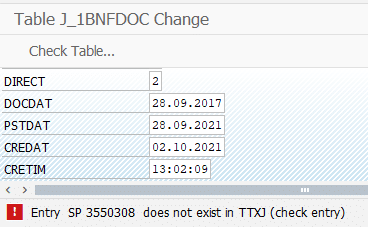
Quem já precisou fazer uma “correção manual emergencial” na tabela J_1BNFDOC  já deve ter se deparado com o erro abaixo (  algumas pessoas chamariam pelo nome científico de “marretada” ;D )

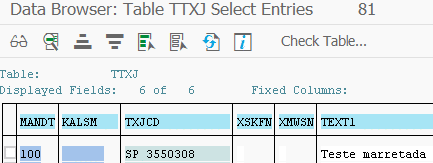
Entrada  SP 3550308  não existe na tabela TTXJ (check entry)

Sabe porque isso ocorre?

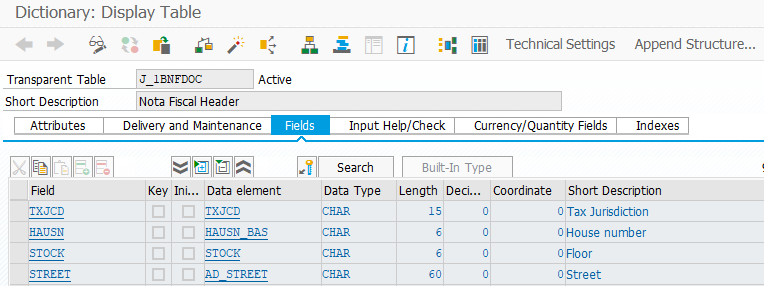
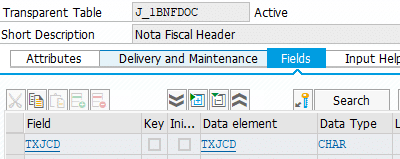
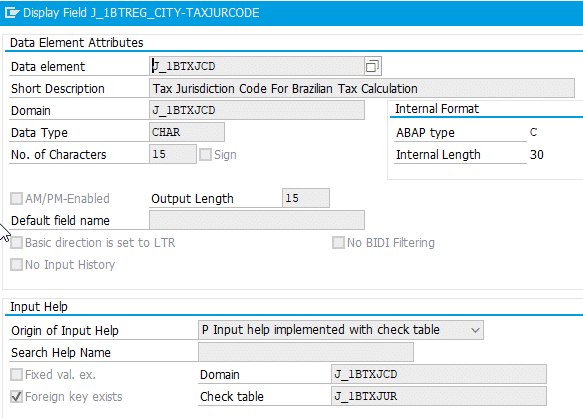
Isso acontece por causa da definição do campo na J_1BNFDOC… Ele usa o campo TXJCD com a tabela de verificação TTXJ:

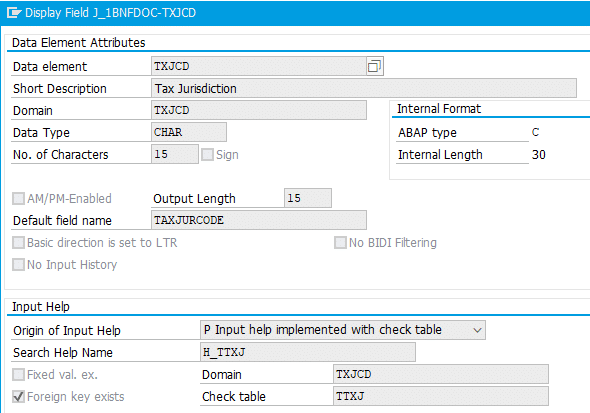
Essa é a definição do campo:

O problema é que a tabela TTXJ não é a tabela de domicílios usada no BR. Então, mesmo que você tenha o docmílio cadastrado para Brasil vai acontecer esse erro.

Para evitar o erro é necessário criar uma entrada na TTXJ com o domicílio preenchido e o campo do esquema de cálculo em branco ( sim, a J_1BNFDOC não tem o esquema de cálculo então o acesso que ele faz na TTXJ é apenas com MANDT e TXJCD ).

Depois de criar a entrada na tabela TTXJ o sistema deixa salvar a “correção manual emergencial” na tabela J_1BNFDOC.

Uma curiosidade, existe um campo específico da localização Brasil para domicilios fiscais. O campo usado da localização é J_1BTXJCD e a tabela de verificação é a J_1BTXJUR ( onde estão todos os dominílios ), mas não é usado na J_1BNFDOC.

Moral da história: Por favor não alterem as tabelas, mas se precisar por algum motivode força maior então façam do jeito certo. Eu acho que o campo J_1BTXJCD podia estar na doc no lugar do TXJCD, mas isso é achismo meu.

Se vocês conhecem outro jeito de corrigir isso, fala aí nos comentários. 

Valeu Gurizada,

Renan

Source: https://s4cn.com/como-evitar-o-erro-do-txjcd-na-tabela-j_1bnfdoc/

SAP® Extended Warehouse Management 2020 Development Overview, Part 2 – Enhanced Integration

 In our previous blog of the 4-part series covering the enhancements brought to SAP EWM by the SAP S/4HANA 2020 release we presented a detailed overview of the improvements we made in the area of User Experience. With this blog, I want to go over what is probably the biggest part of our release: the enhanced Integration. While the main focus was on various production related improvements and innovations, we also enhanced the integration to Quality Management, Serial Number handling and more.

Synchronous Goods Movements from Manufacturing to EWM

Now with synchronous goods movement from Manufacturing to EWM, all updates will be synchronized between the warehouse management and inventory management systems. Through this improvement, users can experience better stock synchronization, avoid monitoring of asynchronous processes and queues, reduce documentation (no inbound and outbound deliveries) and mix consumption from MM-IM and EWM storage locations in one posting.

It is important to note that while this feature was available in the 1909 release, it was only for repetitive manufacturing. Now with S/4HANA 2020 SAP EWM supports the following processes:

  • Confirmations (GR / GI) using discrete and process manufacturing (for repetitive available since 1909)
    • Transactions CO11N, CO15, COR6N, CORK and others
    • Synchronous backflush using PMR (for cross order- and single order parts)
    • Batch determination in EWM for component backflush (REM & PP)
    • Co- and by-products
    • Automatic putaway WT creation
    • Re-processing with COGI
  • Confirmations with HUs (transaction MFHU)
  • Goods receipts for HUs from production (transaction COWBHUWE)
  • GR and GI for order / reservation with transaction MIGO
  • Document-neutral and document-specific reversals
  • Kanban for in-house production strategies ‘working with production orders’
  • PP confirmation BAPIs and APIs
  • MM-IM BAPI_GOODSMVT_CREATE and BAPI_GOODSMVT_CANCEL

We have also included several options to control automatic creation of putaway tasks, as shown in the picture below.

Additionally, we integrated the UI between MM-IM material document display in MIGO and EWM. For that we added a new tab ‘Warehouse Management’ in MIGO on item level to support synchronous posting for:

  • GR and GI for order
  • GI for reservation
  • Cancel and return delivery for material document
  • GR for summarized JIT call

This new tab offers visibility of receiving / consumption bin, EWM material document and EWM putaway task. Furthermore, you can directly navigate from this tab to the EWM warehouse monitor to show material document or putaway tasks.

We are only scratching the surface with this blog, but you can find more details in the “SAP Extended Warehouse Management – scope of 2020 release” document linked here and at the end of this article. One final important point to mention is that this feature is available only for the embedded SAP Extended Warehouse Management on SAP S/4HANA version.

Stock Transfer Kanban Improvements

We also made three improvements in the area of Kanban, available only for the embedded SAP EWM version. Firstly, we made it very intuitive to reverse the Kanban status from FULL to EMPTY in case of user error. EWM warehouse tasks as well as the goods movement shall be reversed. The reverse from FULL to EMPTY process will automatically post stock back into EWM storage locations, put stock back into source storage bin, and re-create warehouse tasks to replenish Kanban. With this enhancement users will save time and reduce errors that can occur during the manual reversal process.

A second improvement for Kanban is the new default exception code we added for setting Kanban FULL with a difference in quantity. Before the 2020 release, it was not possible to enter differences in the “Set KANBAN Container Status” Fiori App but an error message was raised. Now when entering differences for stock transfer with EWM warehouse task, a default exception code is set in the background. This exception code can be customized in the warehouse process type.

Lastly for Kanban, we have added the Inventory Management material document and GM document to the Kanban information display. By double clicking on the document numbers you can navigate forward to each option. This will make navigation and troubleshooting more intuitive.

Enhancements to Quality Management

There are also three enhancements we made in the area of Quality Management. The first and biggest is the integration to QM defects and notification. With this new solution we want to capture defects for products in EWM managed warehouses or production supply areas (PSA), do stock assignments and follow-up actions triggering stock postings for one or multiple materials, all in EWM. Stock that needs inspection can be posted to “Blocked” or “Quality stock”, and after investigation warehouse workers post the stock to ‘free available stock’, ‘scrap to cost center’, ‘return delivery’ or ‘move stock’. Please note that this solution is available only for EWM embedded version.

Another improvement in QM integration is the addition of two new follow-up actions when specifying accounting objects in quality usage decisions. Now users can specify if an object is ‘Scrapped to cost center’ or is posted to ‘Sample consumption’. The example below illustrates how posting an object to scrap would look like in the system. Currently this enhancement is for the embedded EWM version, but we plan to make it available for Decentral SAP EWM on S/4HANA with the Feature Pack 1 release of 2020.

One final enhancement to mention in the area of QM integration is the integration of QM in the production part approval process for first article inspections. First article inspections are controlled in the quality info record by maintaining the corresponding purchase order item for first article delivery. This makes communication between manufacturers and suppliers easier and more efficient.

Enhancements to Serial Number Management

For Serial Numbers we have added a new customizing option that enables harmonized serialization on client and plant level. Harmonized Serial Number Profile includes ERP as well as EWM serialization. The harmonized serial number profile brings ERP and EWM settings together in one profile thereby making it possible to validate the profile in advance before using it. Users will notice that a lot of redundancy will be avoided thanks to this harmonization, as well as the ability to decide on entitled level whether a product should be serialized or not.

Aside from harmonization users can also repair serial number profiles via a new monitor method to delete serialization settings stored in the EWM warehouse product and maintain new profiles. This serial number repair is only possible when no open warehouse tasks, open delivery items or warehouse stock exists.

Accounting Information in Ad-Hoc Goods Movements

A minor but no less significant improvement is the enhancement of the transaction /SCWM/ADGI Post Unplanned Goods Issue. Now with transaction /SCWM/ADGI users can post goods movement for the consumption, scrapping and sampling processes. The account assignment can be changed for a single item when a partial goods issue is posted. For warehouse documents posted with transaction /SCWM/ADGI the account assignment can be displayed in the warehouse monitor.

JIT Supply to Production – Stock Transfer for JIT Call

Finally, I would like to present what is arguably the biggest integration topic of this release, Just-in-Time (JIT) supply to production. The integration with this new solution covers the internal replenishment process for JIT in production supply for the automotive industry. Warehouse workers can now transfer stock from EWM managed storage locations to EWM managed production supply areas (PSA) to accurately and timely supply the production line. The lightweight warehouse request ‘internal stock transfer’ acts as an interface between JIT and warehouse order processing. Please note that this solution is provided for the embedded EWM version only.

The JIT supply to production process in EWM includes the following functions:

  • Creation of stock transfer for JIT followed by an immediate automatic warehouse task creation in EWM, a manual warehouse task creation in EWM or a warehouse task creation via wave management in EWM
  • Change management from the JIT call to the stock transfer for JIT call
  • Process and quantity updates from EWM to JIT during warehouse order processing
  • Monitoring with the EWM warehouse management monitor
  • An enhancement concept with new BAdIs

Just as with the synchronous goods movement enhancements, there are a lot more details to cover for this topic, so I again highly encourage you to check the “SAP Extended Warehouse Management – scope of 2020 release” .

FIND OUT MORE!

There are more minor integration topics that may be worth your attention, such as the global transport label support (GTL) for handling unit management, and you can read about them and the topics we covered above in our “SAP Extended Warehouse Management – Scope of the 2020 Release” document in the following link:
https://dam.sap.com/mac/embed/public/pdf/v/mzWrXsc.htm

In case you missed the first part in our overview series, you can find it in the link below:
https://blogs.sap.com/2020/10/08/sap-extended-warehouse-management-2020-development-overview-part-1-improved-user-experience/

For more information about SAP Extended Warehouse Management, please follow us on social media, our YouTube channel or our community pages:

SAP EWM Community:

https://www.sap.com/community/topics/extended-warehouse-management.html

SAP Digital Supply Chain Channel:

https://www.youtube.com/channel/UCELmE2CEAkcwqpBLnuZHufA

EWM LinkedIn Community:

https://www.linkedin.com/groups/1952257/

Release information and restrictions of embedded EWM on SAP S/4HANA 2020:
https://launchpad.support.sap.com/#/notes/2938306

Release information and restrictions of Decentralized EWM on SAP S/4HANA 2020:

https://launchpad.support.sap.com/#/notes/2938308

For a complete list of Q&A from the EWM community, please access this link:
https://answers.sap.com/tags/01200615320800000705

In case you do not find your specific question there, feel free to post your question via the following form:
https://answers.sap.com/questions/ask.html?primaryTagId=01200615320800000705

Source: https://blogs.sap.com/2020/10/14/sap-extended-warehouse-management-2020-development-overview-part-2-enhanced-integration/?utm_campaign=meetedgar&utm_medium=social&utm_source=meetedgar.com