sexta-feira, 19 de agosto de 2022

Delivery and Shipment handling units

 Business Requirement :

1.Creation of Delivery Handling unit for over packing and master cartons even if over packing is not required.
2 Creation of Shipment Handling Unit for boxes packed in Deliveries to allow receipt by HU# in the receiving plants.

Challenges : While creating shipment handling unit, all the delivery handling units are automatically attached to the shipment handling unit and they are deleted from deliveries when the BAPI (BAPI_HU_CREATE) is used. BAPI_HU_CREATE has the parameter LOWER_LEVEL_EXID is present in tables parameter (BAPIHUITEM), however after using this parameter to attach the delivery handling units to Shipment, these handling units are deleted from delivery.

Solution – In order to avoid above issue we had gone ahead of different approach and able to attach the delivery handling units to shipment with correct hierarchy. we need to call the below bapi’s in sequence to achieve the above functionality

head_proposal-hu_status_init = Pass 'A' ."Planned.
head_proposal-pack_mat = Pass Packaging Material
"Call the below function module to create an Unassigned HU object.
CALL FUNCTION 'BAPI_HU_CREATE'
EXPORTING
headerproposal = _head_proposal
IMPORTING
huheader = hu_header
hukey = hu_key
TABLES
return = return.
IF hu_key IS NOT INITIAL.
"Call the below function module to Commit the data
CALL FUNCTION 'BAPI_TRANSACTION_COMMIT'
EXPORTING
wait = 'X'
IMPORTING
return = return.
" Assign to a Shipment
hu_header-pack_mat_object = '04'. "04-HU Type for Shipment
hu_header-pack_mat_obj_key = Shipment number "Shipment #
hu_header-lenght = Pass Pallet length
hu_header-width = Pass Pallet Width
hu_header-height = Pass Pallet Height
hu_header-total_wght = Pass Pallet weight
hu_header-unit_dim = Pass Pallet Uom for dimensions
hu_header-unit_of_wt = Pallet Uom
hu_header-max_unit_of_wght = Pallet Uom.
ENDIF.
"Call the below function module to assign the handling unit to shipment
CALL FUNCTION 'BAPI_HU_CHANGE_HEADER'
EXPORTING
hukey = hu_key
huchanged = hu_header
TABLES
return = change_return.
IF change_return[] IS INITIAL.
"Call the below function module to commit the data by assigning Shipment to Handling Unit
CALL FUNCTION 'BAPI_TRANSACTION_COMMIT'
EXPORTING
wait = 'X'
IMPORTING
return = return.
" Get the Internal Handling unit based on external handling unit and prepare the handling unit numbers (Box_pallet_venum) which needsto be passed to below function module.
" The below function module is called for filling the global memory
CALL FUNCTION 'HU_GET_HUS'
EXPORTING
if_lock_hus = co_x
if_no_loop = co_x
it_venum = box_pallet_venum
EXCEPTIONS
hus_locked = 1
no_hu_found = 2
fatal_error = 3
OTHERS = 4.
"Each and every Internal handling unit (Boxes) to be attached to shipment and the below function module should be called in a loop.
packing_request-venum = Hu_header-hu_id.
packing_request-exidv = hu_key.
packing_request-velin = '3'.
packing_request-sub_hu_venum = vekp-venum.
packing_request-quantity = '1'.
Packing_request-veanz = '1'.
" The below function module is called to Repack the deliveries in the shipment which is required for hierarchy in shipment
CALL FUNCTION 'HU_PACKING_AND_UNPACKING'
EXPORTING
if_repack = 'X'
is_packing_request = packing_request
IMPORTING
ef_rcode = return_code
CHANGING
cs_header = cs_header
EXCEPTIONS
missing_data = 1
hu_not_changeable = 2
not_possible = 3
customizing = 4
weight = 5
volume = 6
serial_nr = 7
fatal_error = 8
OTHERS = 9.
IF sy-subrc EQ 0.
" Call the below function module to commit the data by assigning Shipment to Handling Unit
CALL FUNCTION 'BAPI_TRANSACTION_COMMIT'
EXPORTING
wait = 'X'
"If the Pallet packing is successful then only call the below function module
" The below function module commits the data to database.
CALL FUNCTION 'HU_POST'
EXPORTING
if_commit = 'X'
ENDIF.

Negative  results – ( when the Bapi  Function module (BAPI_HU_CREATE) is used and passing the parameter  LOWER_LEVEL_EXID), the output as follows

  1. Delivery handling units are correctly packed and the hierarchy is correct

2. However when we pack the  delivery boxes to shipment the hierarchy is off as shown below. The hierarchy should be ‘0’ for Shipment  handling unit,’1′ for delivery handling unit  and ‘2’ for material.

Positive results – ( when the Function modules are called in sequence as suggested in the blog)

1.The handling units for delivery are shown below which was successfully attached to delivery

2. HUPAST tcode for handling units with respect to delivery.


3. Handling units with respect to delivery shown below and the important element is the hierarchy (Shipment handling unit comes first , then delivery handling unit and then the packaging materials.


Note : The above usage of FM’S and Bapi’s needs to be called sequentially as shown above to achieve the functionality. The high level code is provided as solution

Source: https://blogs.sap.com/2017/08/17/delivery-and-shipment-handling-units/

Delete Handling Unit (HU) via FM

 There is a possibility to change HU data via Functional module. Go through the instruction below:

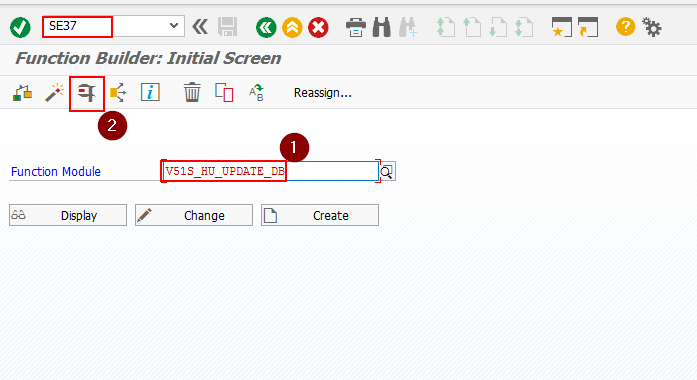
1) Go to Transaction SE37

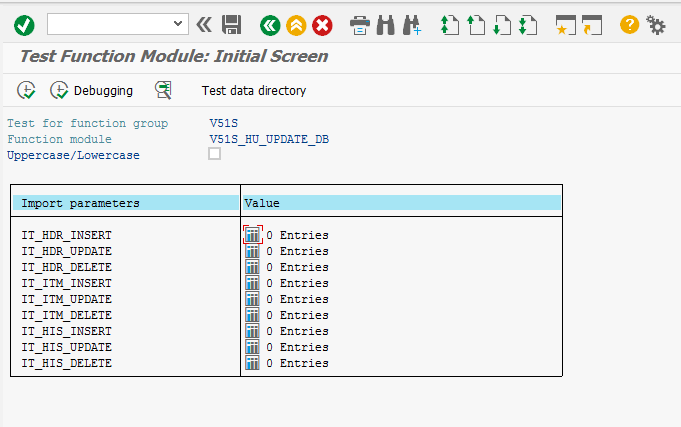
2) Enter FM: V51S_HU_UPDATE_DB and press F8

3) Select necessary action (Insert, Update, Delete) on apropriate level (Header or Item)

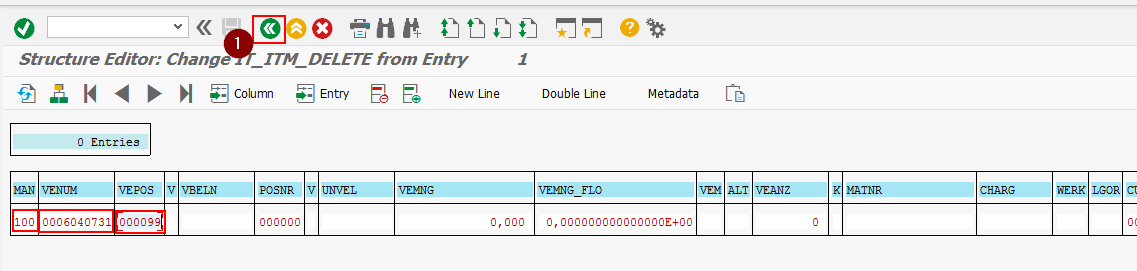
4) Enter key values and Back to previous screen

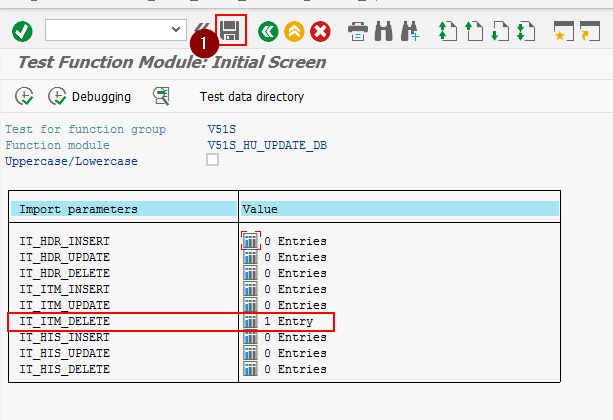
5) Save

6) Check result in tables VEKP, VEPO

Source: https://marchukan.com/delete-handling-unit-hu-via-fm/

Picking Nested Handling unit through Pick Handling unit


Purpose:

The conceptualization of this blog is to understand what is Pick Handling unit(HU), Nested HU and how in WM+HU managed Storage location, picking and packing is conducted in one step( Pick and Pack Procedure).


Overview:

Picking and packing is very vital business process in a warehouse and complexity happens when storage location is WM+HU managed and to pack the outbound delivery, VL02N triggers an error saying Packing in HU+WM managed location takes place through picking, technically through LT03.

Lets understand what is Pick HU. In my own understanding Pick HU is a Blank or empty HU in which some other HUS can be packed or materials can be packed.

If you want to understand the meaning of Pick HU in terms of Help.salp, here is the definition.

–>Partial quantities (materials or lower-level HUs) are transferred to a picking container such as a cart or container tub. This picking container, in turn, represents a handling unit, the pick handling-unit (HU).


Nested Handling units are kind of a concentric packaging layers in which multiple Sub Handling units are assigned in a main handling units. Like in a container—>Pallets—Boxes—Small boxes—Bottles.  A 4 level nested HU. Nested HUs are created by handling unit master transaction HU02 or can be created by HUPAST( Handling unit Packing Station)


Why Pick HU is required and its conceivable application?

Suppose you have a mixed storage type where multiple storage units of same materials are available in a storage bin or you have  handling unit with several materials or batches, business requirement is to conduct picking once Sales order is created, Outbound delivery is done and picking orders needs to be created to pick the Source HU as a destination HU from a inhomogeneous handling units.  In this case you are required to create a pick HU.


So, Picking a nested handling with a pick Handling unit can be better understood with below diagram.

In the diagram shown, there is a nested HU which consists of 9 boxes and suppose in 9 boxes there are different bottles or understand this Storage unit has multiple batches of same material, 9 batches. Both probability may happen with business.

To pick Box-1 which is available in a nested HU or multi batch SU, we need to create a blank Picking Unit which is in our case is Pick handling unit. We cannot move the complete Nested HU from destination storage Bin to 916 shipping area directly as this is restricted in standard SAP.


Configuration and process flow:

1 Create a sales order VA01

2 Create an outbound delivery VL01N

3) Check the inhomogeneous HUs/ SUs in Bin Status Report LX03

4) Create picking order LT03

5) Create a Pick HU by LH01 or with LT12

6) Confirm the Transfer order LT12


We will start from point 3 as i have already created SO and OBD.

3) Bin status report LX03. Observation can be made the storage type is mixed storage type where multi Sus are present.


Storage type configuration:


4) Create Transfer order LT03.

I created a transfer order and found that Quant is updated as 0 and blank SU. Since after picking order creations, material will be moved to 916 interim storage type with Outbound delivery as material coordinates( Bin number).( Dynamic bin numbering with the requirement type of delivery is configured in backend)


Before we create a pick HU, lets understand what error SAP gives if we directly confirm Transfer order in LT12.


During TO confirmation, it can be observed that Source HU as destination HU is not copied in TO despite the configuration done for the required storage type.

This indicator suggests that during TO confirmation Source HU=Destination HU. But in our case, destination HU is blank.

The reason is that our HU is inhomogeneous 3000001078, the HU picking control is only applicable for Homogeneous HUs


So, to pick from an inhomogeneous Handling units( A HU with several materials or batches), we have to conduct repacking by creating a Pick HU by LH01.


Technical perspective: 

There is one way to find if Pick Handling unit will be created for Transfer order or not. To determine if HU needs to be created for TO, the field LTAP-FHUTA must be set as 1. This field is set after checking if there is a HU requirement on the storage location. If there is none, then a pick HU is not required.

Lets check ours in LTAP table. We cab observe that the required field is set and hence Pick HU creation is indispensable


The check happens a below source code(SE38). The below source code checks if the storage location is HU managed or not.


5) Create a Pick Handling unit by LH01. 

In LH01, you need to assign the packaging material. The Pick HU is specific to Transfer order and delivery hence table LTHU  is updated.


6) Confirm Transfer order by LT12.

The destination storage type is referenced from Pick HU which we had earlier created.Since Pick HU is specific to TO hence, it is defaulted in LT12 as destination SU.

Click on Confirm Internally


An error is triggered saying HU is nested(Multi layered). This error occurs when you skip a POP up screen which is displayed after clicking on Confirm Internally. My intention was to show the error if you skip to fill the pop screen.


Pop Screen in LT12.

So you need to mention the lower level HU from from which Stock will be picked.

There is a catch here. 2 very important characteristics of this screen and 2 different business function can be conducted from here

  1. If indicator is unchecked HU withdrawal, only material will be packed into the pick HU

2. If checkbox of HU withdrawal is marked, the Sub HU will be further packed into the Pick HU.


Lets check our nested HU.

The outer HU is shown in arrow and total of 6 quantities are packed. The outer HU contains 6 sub level HUS, a Nested Handling unit.


So, once TO confirmation is saved, 1 qty of SUB HU will be transferred to pick HU.

So, you can see now total quantity is decreased by 1 as 1 qty is packed into Pick HU.


It can be observed that the material of HU 8006535984 is deassigned and it is assigned to Pick HU.

Lets check the final screen of Confirmed Transfer order. The nested HU was our Source storage unit from which picked a lower HU by Pick HU and same was referenced in Destination storage unit.

Hence the process of Pick HU creation and Nested HU picking end here. In my next blog I will touch QM+HUM+WM interface, a very complex topic which is not too much discussed in SCN and latter Serialization of Handling units.


Please share your views or correction in this regard.


references:

https://help.sap.com/erp2005_ehp_07/helpdata/en/41/34bb536b13b44ce10000000a174cb4/frameset.htm

https://help.sap.com/saphelp_erp60_sp/helpdata/en/9d/8cbf53f106b44ce10000000a174cb4/frameset.htm


Best regards

Shailesh Mishra


SAP IDOC base Integration Error Handling & Monitoring guide

  The PI implementation will consist of a wide variety of SAP development objects requiring error processing and monitoring procedures.  A unified strategy across development objects is required to control error message generation, logging, resolution and monitoring in this environment.

         In build phase of any Integration scenario when application support strategy is not very define then there are always challenges to handover  development to support team i.e core team member of project as that team is new to SAP World and not aware of each functionality SAP.

I think this document will help to guide step wise process to  Core Team member.It can be used for Train the trainer  session as well .

Once interface runs, interface monitoring team would analyze the errors and take action. It involves following steps –

A.     Analyze errors

B.     Reprocess eligible idocs

C.     Edit IDOCs and reprocess

D.     Provide CIS feedback on failure cases

E.     Purge unwanted idocs

A.     Interface Errors – Analyzing Steps:

1.      Execute Transaction BD87 in SAP ECC with below parameters

Created on Date Range & time  ( analysis period)

Message Type = Required one

2..      Idoc in Error Status can be shown a ( Idoc with status 51 is in Error).

Error_A.JPG

3.      Analyze each of the error cases. 

4.      Any new case or error message needs to be diagnosed by  support team..

5.      Report can be downloaded after  double click on main node .

Report_A.JPG

B.     Reprocess eligible IDOCs

1.      IDOC error can be corrected broadly by correcting related data in production or by reprocessing the IDOC again

(sequencing related erros  or lock related error). .

2.      .Based on analysis above, correct data (if needed)

3.      Execute Transaction code SE38, Program Name = RBDMAIN2 with below parameters

Created on Date Range & time

Message Type = Required one

Message Class =  (As per analysis abpove)

Message Number  = (As per analysis above)

report_b.JPG

C.     Edit IDOCs and reprocess

1.      In certain cases, we can edit IDOC and reprocess.

2.      In such cases, Idoc can be edited via WE05.

3.      Execute transaction WE05 with below parameters

Created on Date Range & time

Idoc number = (As per analysis)

report_e.JPG

idoc_c.JPG

4.Individual Idoc will be selected and click on documentation icon &  Data can be change via Menu selection as shown below

idoc2_c.JPG

we05_c.JPG

6. When an IDoc is edited, SAP changes status of original idoc as 70 and marks it as successful. A copy of changed idoc is saved in status 69. We need to reprocess this new idoc (status 69) using BD87.

69_c.JPG

7. Execute Transaction BD87 with below parameters

                 Idoc Number = As generated above

69_report_C.JPG

69_report3_c.JPG

  D.    Resend Record to Source System for data correction at their End.

  1. As per Idoc error analysis in step A, certain records can not be handled in target system(ECC) and needs to be resent to Source

       for actual data correction.

  2. In such cases where data need to be corrected at source end, report can be generated as which idocs have failed and needs correction.

  3.Execute Transaction Code WE05 With below parameters

  • Created on Date Range & time
  • Idoc number = selected from BD87 Report
  • Select Idoc with status 51 ,and click on details & Select Segement Name

1_d.JPG

1_N_d.JPG

4.Report would be displayed which shows all three important parameters of the failed record 

4_d.JPG

5.This report needs to be downloaded in local directory and sent to Source system (Manual Step).

6.There is also one more design can be suggested ,Every Idoc have objectkey as reference field,via ABAP Code that can be updated and unique combination of that object key & can be used .

E.     Purge IDOCs:

  1. After confirmation on scenarios where Idocs need not to be processed any further in SAP, we can delete them.
  2. This activity need not be a daily activity but is a part of house keeping activity.
  3. Recommended frequency is monthly (after reconciliation)
  4. Execute transaction of WE11 with below parameters

Created on Date Range & time

Idoc number = selected from BD87 Report

E_purge.JPG

These above functionality need to have correct authroization role set up in Production enviroment of SAP,i.e kind of SAP Support Idoc Admin team to execute all above steps or other wise alternate options of using SAP Standard report like as below.

RBDAGAIE – Reprocessing of Edited IDocs

RBDAGAI2 – Re-processing of IDocs after ALE Input Error

RBDAGAIN – Process Outbound IDocs with Errors Again

I believe this guide will  able to help team to provide proactive information to business application support &  deliver the best customer service .    

Source: https://blogs.sap.com/2012/03/20/sap-idoc-base-integration-error-handling-monitoring-guide/