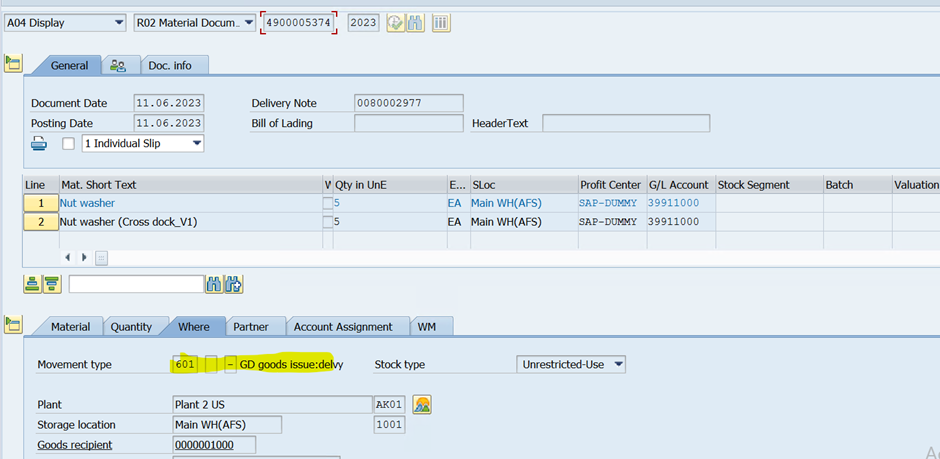
To make space for the new, you may need to let go of the old. Replace the horse with the automobile. Replace the newspaper with the television. Replace the record player with the CD with the DVD with the Blu-ray with the iPod with the Spotify playlist.
Like hardware, software apps have a lifecycle. For consumer apps like Facebook and X, new versions of apps are usually forced upon you, and you just have to deal with it. In the SaaS world, where your business needs to keep running 24x7, you get a little more notice and guidance.
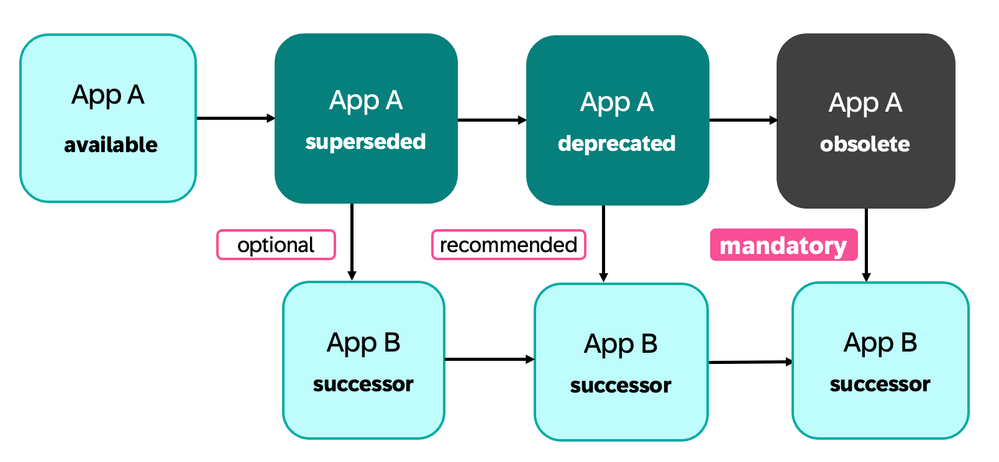
With SAP S/4HANA (and SAP S/4HANA Cloud), whenever you upgrade your release, you may need to replace your current apps with their successors. The app lifecycle determines when a successor app is available, and when you should stop using the predecessor app. That is:
- By marking an app as deprecated SAP gives formal notice of the intent to make the app obsolete in a future release.
- You must move to the recommended successor.
- You can move as early as the successor becomes available, or as late as the predecessor app becomes obsolete.
Hint: In this context apps includes all UI technologies supported by the SAP Fiori launchpad i.e. SAP Fiori apps, ABAP Web Dynpro applications, WebClient Ui apps, and SAP GUI Transactions.
IMPORTANT: It’s not just apps that may need to be replaced, you may also need to move to successor features, successor tools, and so on. Refer to the section in this blog post: Other types of UX changes you may encounter during upgrades.
Understanding the app lifecycle saves you time when:
- planning your upgrade
- executing your upgrade
- deciding what new opportunities to explore post-upgrade
- managing the change impacts on business users
In this blog post you will learn:
- Stages in the app lifecycle
- Choosing the right time to move to the successor
- How app lifecycle changes impact SAP S/4HANA release upgrades
- Other types of UX changes you may encounter during upgrades
- Tips for managing change impacts on business users
You may have already noticed the deprecated mentions in the SAP Fiori apps library, in the What’s New Viewer for SAP S/4HANA, and in the RASD (Release Assessment and Scope Dependency tool) for SAP S/4HANA Cloud. Just in case you haven’t, take a look at the final section:
- Where to find information on app lifecycle changes
Stages in the app lifecycle
The 4 main stages are:
- Available
- Superseded
- Deprecated
- Obsolete
These stages are easy to understand. If your app is:
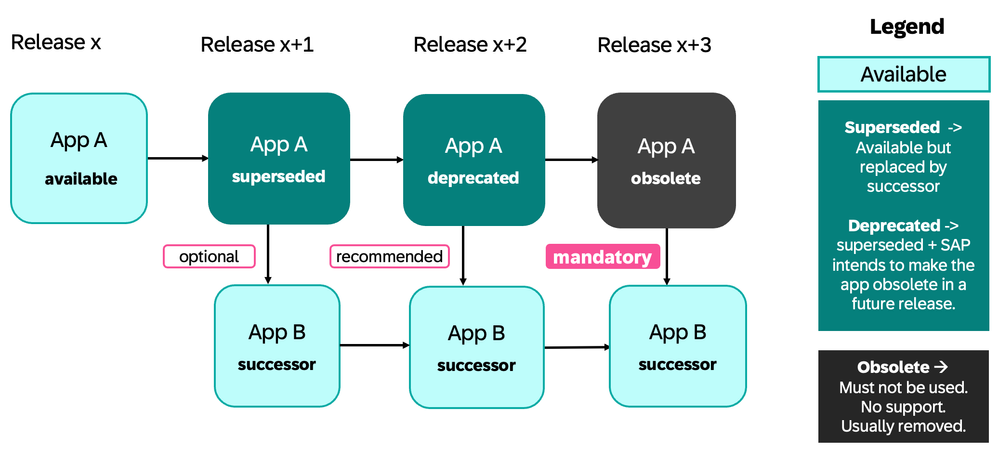
- Available – This means the app is currently available for use.
- Superseded – This means the app is still available for use, however a successor app has been introduced. You should consider moving to the successor.
- Deprecated – This means the app still exists; however, SAP no longer recommends its use, and it will be deleted from the SAP Fiori launchpad in an upcoming release. You are recommended to move to the successor as soon as possible.
- Obsolete – This means the app must not be used. Usually, the app has been deleted and no longer exists. You must move to the successor.
As soon as the successor app is available you can shift to the from the predecessor to the successor app.
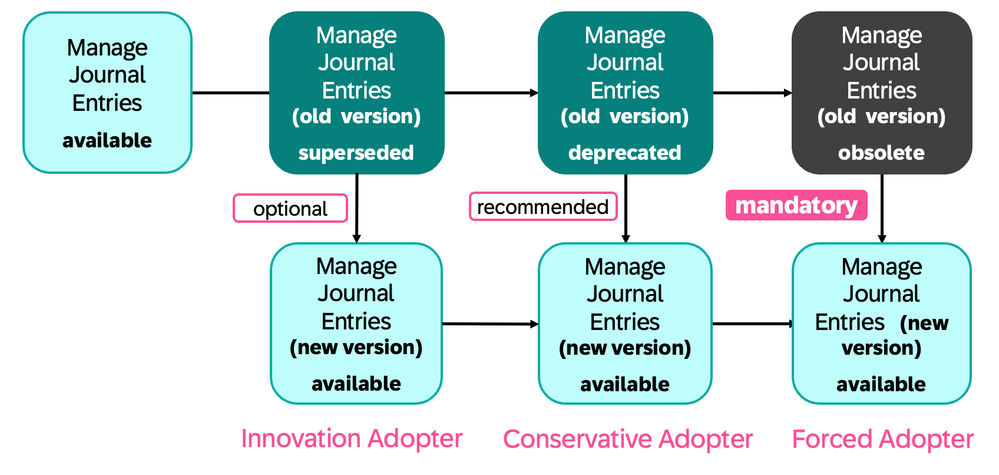
- When the app is superseded, it’s optional to move to the successor
- When the app is deprecated, it’s recommended to move to the successor
- When the app is made obsolete, it’s mandatory to move to the successor
You can see in the diagram below a summary of these stages.
Hint: Occasionally an app may have minor changes applied by a new release, such as new features added to the floorplan to download tables to Excel, PDF, and Google Sheets, or new features to add related apps for simpler navigation. These minor changes are part of the app history and are not considered a change in lifecycle stage.
Hint: When an app is superseded:
- The app may be replaced one or more successors
- The app may also have no successors, i.e. is no longer required
For each app, these lifecycle stages usually occur across several releases.
- An app may be available for a long time before it moves to the other stages.
- Once an app is superseded however, it may move quite quickly to other stages.
- An app marked as superseded in one release, may be marked as deprecated in the next release.
- Officially, there's a period of at least six months between the initial announcement of an app's deprecation and its deletion in SAP S/4HANA Cloud. Refer to Deprecation Process for Apps (SAP S/4HANA Cloud).
- With SAP S/4HANA upgrades the more distance between your current release and target upgrade release, the more deprecated and obsolete apps you are likely to encounter as part of your upgrade. Refer to Prepare the SAP Fiori Upgrade (SAP S/4HANA)
IMPORTANT: An app can go from available to deprecated without passing through superseded.
Examples of app lifecycle stages
For example, app F0842 Manage Purchase Orders was:
- Available from SAP S/4HANA 1511
- Superseded with release SAP S/4HANA 1709 with the introduction of app F0842A Manage Purchase Orders (Version 2)
- Deprecated with SAP S/4HANA 1909
- Obsolete from SAP S/4HANA 2020. That is, the app was deleted from the solution.
Of course you may encounter the app at any lifecycle stage.
For example, the app F0717 Manage Journal Entries:
- Was available from the beginning of SAP S/4HANA Cloud and SAP S/4HANA 1511,
- Was superseded from SAP S/4HANA Cloud 2308 and SAP S/4HANA 2023.
- Is deprecated from SAP S/4HANA Cloud 2402.
- It has not yet been deprecated in SAP S/4HANA, but this is expected to happen in an upcoming release.
- A decision has not yet been made when the predecessor app will be made obsolete.
- Hint: This is normal. With very popular apps, the product owner may allow a little more time for customers to transition to the new app.
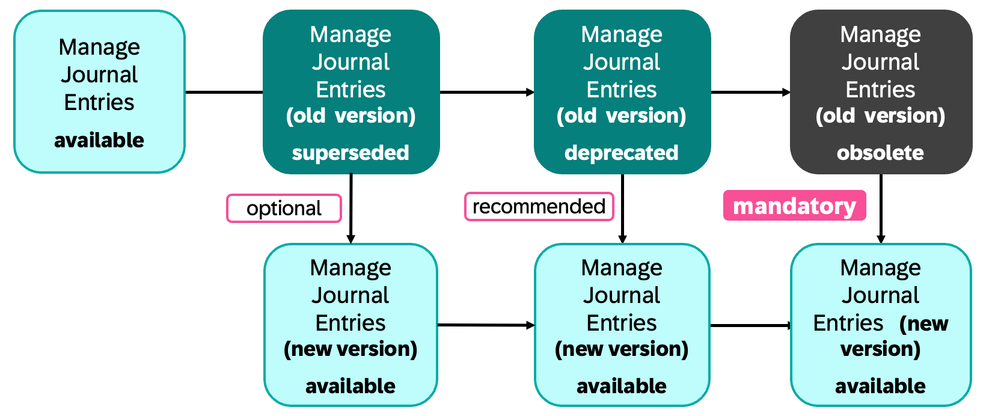
So at the time of writing (March 2024), you have some choices on when to move from F0717 Manage Journal Entries (old version) to F0717A Manage Journal Entries (new version):
- You can choose to move to the successor early (from SAP S/4HANA Cloud 2308 or SAP S/4HANA 2023).
- You can wait to move to the successor when recommended (from SAP S/4HANA Cloud 2402)
- You can must move to the successor when F0717 becomes obsolete.
Choosing the right time to move to the successor
Consider which adopter profile suits your needs.
If you wish, you can use a different adopter profile for high-risk heavily used apps versus low-risk apps that you have only deployed to a few users.
Adopter Profiles:
- Innovation Adopter – Moves when app is superseded
- Pros – You get the new business value improvements of the successor app early as possible. You have time to evaluate and move at leisure post-upgrade.
- Considerations – Consider giving early feedback to SAP. You have time to ask for improvements if there’s anything you would like added or changed.
- Conservative Adopter – Moves when app is deprecated
- Pros – You avoid commercial support issues, such as SAP Incidents being redirected to Consulting.
- Considerations – If it’s too complex to move during upgrade, for example because of extensions you want to apply, you still have time to transition to the new app post-upgrade.
- Forced Adopter – Moves when app is made obsolete
- Considerations - You must move as part of upgrade. You accept the time pressure risk – you may have to make business decisions and complex changes in a rush. You risk not being able to apply adaptations or extensions you need for your processes.
You can see the adopter profiles summarized below, mapped against the journey from F0717 Manage Journal Entries to F0717A Manage Journal Entries - New Version:
How app lifecycle changes impact SAP S/4HANA release upgrades
Once you understand the app lifecycle, you can more easily manage release upgrades.
Release upgrades are your opportunity to take on new innovations and increase the business value of your solution. That said, with any release upgrade your business users are likely to expect a little disruption. With every release upgrade your aim should be to:
- When planning your upgrade, mass evaluate app lifecycle changes using upgrade tools such as SAP Readiness Check for SAP S/4HANA Upgrades or the SAP Fiori Upgrade Impact Analysis
- During release upgrades, minimize unnecessary disruption now and later for business users by focussing on mandatory changes and easy moves to successor apps.
- Post-upgrade is the ideal time to evaluate new opportunities, such as introducing new apps, to review interesting existing apps you are not yet using, and to make more complex moves to successor apps.
For each app lifecycle stage, there are some considerations to keep in mind.
Obsolete apps:
- Must be replaced during release upgrade, as they no longer exist.
- SAP-delivered business role templates are automatically updated.
- You must replace the app in any custom business roles.
Deprecated apps:
- Where you can do so easily, speed up and simply future upgrades by moving your custom business roles to successor apps during release upgrade.
- Replacing deprecated apps before they become obsolete avoids disruption later and gives you extra time to manage the move to the successor.
- Post-upgrade is the right time to execute more complex must-change shifts to successor apps. For example, where you need to re-evaluate and re-apply extensions before you can adjust your custom business roles.
Superseded apps:
- Where you can, exploring apps during post-upgrade when they are first superseded can avoid difficult “but how” discussions when they are made deprecated/obsolete.
- There is time to raise queries about app behaviour and extension options.
- If you wish, you can make the successor and predecessor versions available in the same custom business role, to encourage your users to try out the successor app.
App changes:
- Changes to existing apps are usually minor, or part of the app’s floorplan. Most changes are automatically applied during upgrade. These can typically be reviewed during regression testing.
New available apps:
- New available apps can be evaluated post-upgrade. It’s worth using the mass evaluation upgrade tools to capture a list of new apps. Having a ready-to-use list of new apps eases reviewing the new apps later.
When you are ready to change your custom business roles you can use the appropriate tools.
In summary for each type of app change there is a matching upgrade impact:
Type of App Change | Upgrade Impact |
Existing app is obsolete | Must replace during upgrade |
Existing app is deprecated | Replace during upgrade, if possible. If not, aim to move to the successor post-upgrade. |
Existing app is superseded | Evaluate the successor app post-upgrade, consider moving before next upgrade |
Existing app has changes | Automatically applied during upgrade |
New app made available | Evaluate post-upgrade |
Other types of UX changes you may encounter during upgrades
You should be aware of other UX changes that can impact your upgrade. Mostly you need to be aware of these changes, and make sure affected business users are also aware of these. In some cases, you may need to adjust regression tests.
The most important changes and their impact are summarized in the table below, along with a selection of examples from SAP S/4HANA 2023 and SAP S/4HANA Cloud 2402.
A particular watchpoint are changes to CDS Views, which may impact custom analytics built on these views. Refer to Deprecated and Decommissioned CDS Views (SAP S/4HANA) and Deprecated and Decommissioned CDS Views (SAP S/4HANA Cloud)
The most important of these are covered in major release announcements such as
Type of Change | Priority for Upgrade | Examples |
Launchpad feature changes | Must prepare – mandatory features Can defer - optional features | Mandatory - Time Zone Handling Enhanced (SAP S/4HANA Cloud) Optional - New launchpad features such as System Info Bar (SAP S/4HANA) |
Changes in floorplans, such as List Report, Analytical List Page, Overview Page, Smart Business KPI Report, etc. | Must prepare – mandatory features Can defer - optional features | Mandatory – New Copy Button for Copying to Clipboard (SAP S/4HANA Cloud) Optional - Share to Microsoft Teams(SAP S/4HANA Cloud) and Integrate Microsoft Teams (SAP S/4HANA) |
Business role changes • New business roles • Changed business roles, i.e. changes in business catalogs | Can defer - New SAP business role templates Must prepare – Changes to existing SAP business role templates IMPORTANT: You can minimize mandatory changes by creating custom business roles | Mandatory - Change of Business Roles in Retail (SAP S/4HANA) Optional – new business role Master Data Specialist - Maintenance Management (SAP_BR_MD_SPECIALIST_EAM). Refer to Business Role Template for Master Data (SAP S/4HANA) |
CDS Views changes • New CDS Views released • CDS Views can be changed, deprecated, or decommissioned (i.e. deleted) | Can defer to post-upgrade – New CDS Views, CDS View deprecations Must prepare - CDS View changes + decommissioned CDS Views | Mandatory – Adjust custom analytics using the changed/deprecated CDS View as soon as possible. Refer to Deprecated and Successor CDS Views for Collateral Management (SAP S/4HANA) |
Authorization/ Restriction changes | Must prepare – Changes to authorizations/restrictions affecting existing apps | Mandatory - IAM: Restriction Type "Functional Area" (SAP S/4HANA Cloud) Mandatory - Authorization Object for Maintenance Plans (SAP S/4HANA) |
Extensibility and Administration tooling changes, including Key User Extensibility changes | Must prepare – changed/ deprecated/obsolete tools in use Can defer – new tools | Mandatory – Launchpad Designer features deprecated (SAP S/4HANA). If you have created custom technical catalogs using the Launchpad Designer, use the new tool Migration of Technical Catalogs to move them to the Launchpad app manager. Optional - New: Review Booklet Designer in the "Manage KPIs and Reports" App (SAP S/4HANA Cloud) |
Tips for managing impacts on business users
Few people like surprises – even welcome surprises! Involving your business appropriately in release changes avoids confusion and helps you manage expectations.
You will usually want to work with your business stakeholders, for example you might ask them to recommend which business users should be involved in evaluating the successor apps and app changes.
For general app changes, it’s usually sufficient for the business user to take a look and see if any change management is necessary.
For successor apps:
- Make sure users are aware that a successor app exists.
- Work with the more pro-innovation / pro-active users to review the successor app.
- Verify the SAP-delivered context-sensitive help (accessed via the help “?” icon) for the successor app is sufficient for your needs. Optionally, adjust the help content in SAP Enable Now.
- Discuss when to move to the successor app with your business stakeholders.
- When applying changes, make sure changes to business roles are clear. If you are going to have the predecessor app and successor app available at the same time, make sure they are marked on the tile.
Hint: In SAP-delivered business role templates, deprecated apps may no longer be available by default on the SAP Fiori launchpad.
- In which case, you can find it in the app finder until it's deleted.
- Alternatively, the app tile may be changed to add a text to show the app is deprecated.
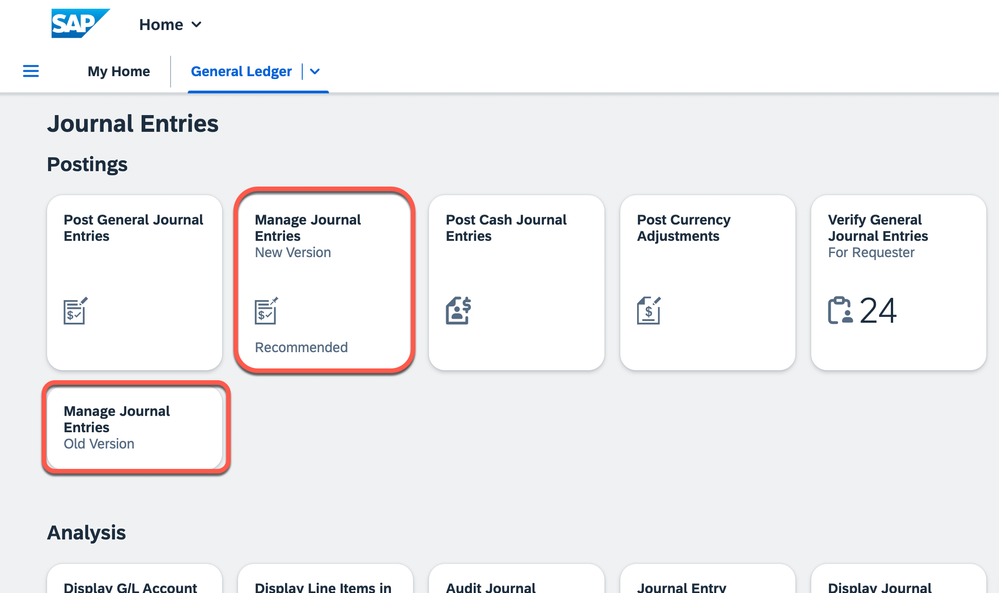
Example below of the SAP delivered business role General Ledger Accountant in SAP S/4HANA 2023 (and SAP S/4HANA Cloud 2308), where Manage Journal Entries is superseded. Both the predecessor and successor have been made available and the tiles marked as “New Version Recommended” and “Old Version” to clarify successor and predecessor.
Where to find information on successor apps
You can find information on the lifecycle stage of apps in many of the usual SAP resources, such as:
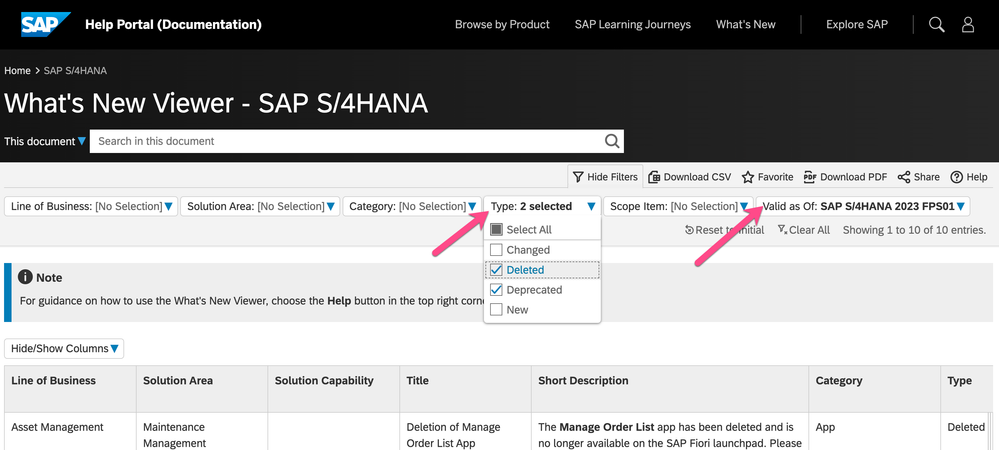
In the What’s New Viewer adjust the type to find obsolete (deleted) and deprecated changes between your current SAP S/4HANA release and your upgrade target SAP S/4HANA release.
For mass evaluation of all your current apps use either of these tools:
IMPORTANT: These tools cover lifecycle changes in all UI technologies supported by SAP S/4HANA and SAP S/4HANA Cloud, including SAP Fiori apps, Web Dynpro ABAP apps, WebClient UI apps, and SAP GUI transactions. Custom apps can be submitted to the review and will be flagged as “unknown apps”.
These tools are mostly driven by the details in the SAP Fiori apps library.
In the SAP Fiori apps reference library apps are available by default.
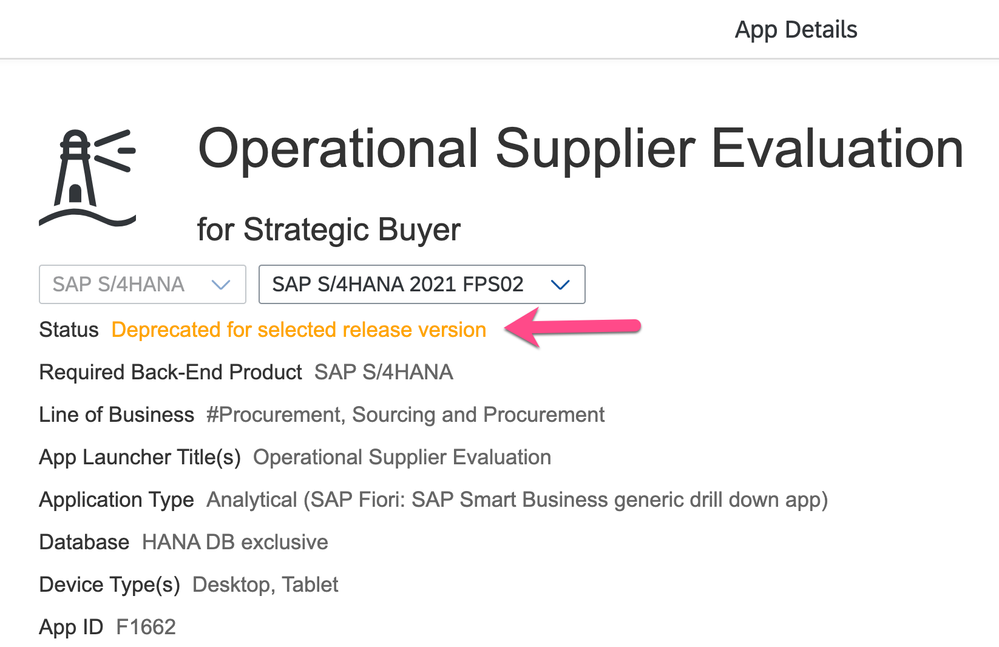
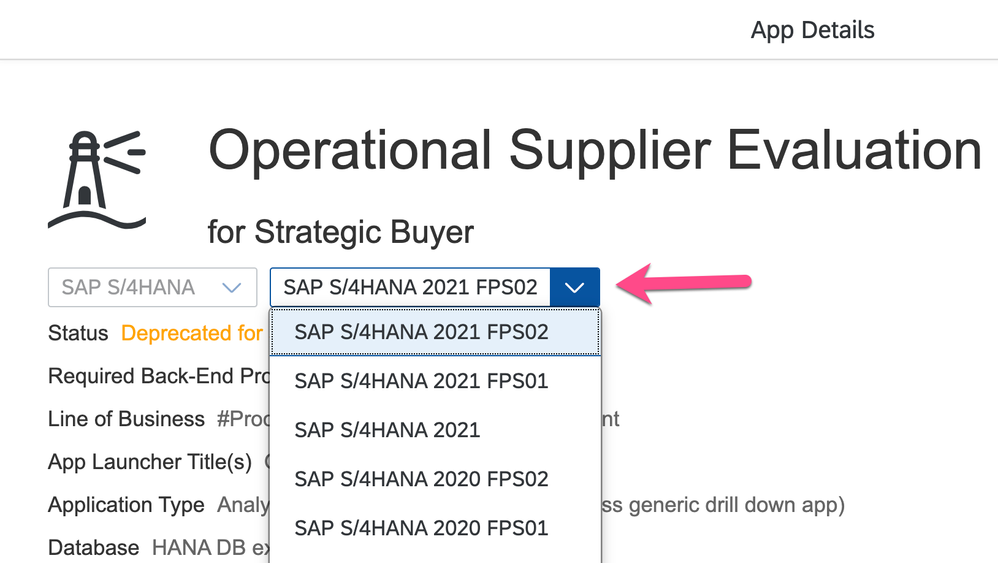
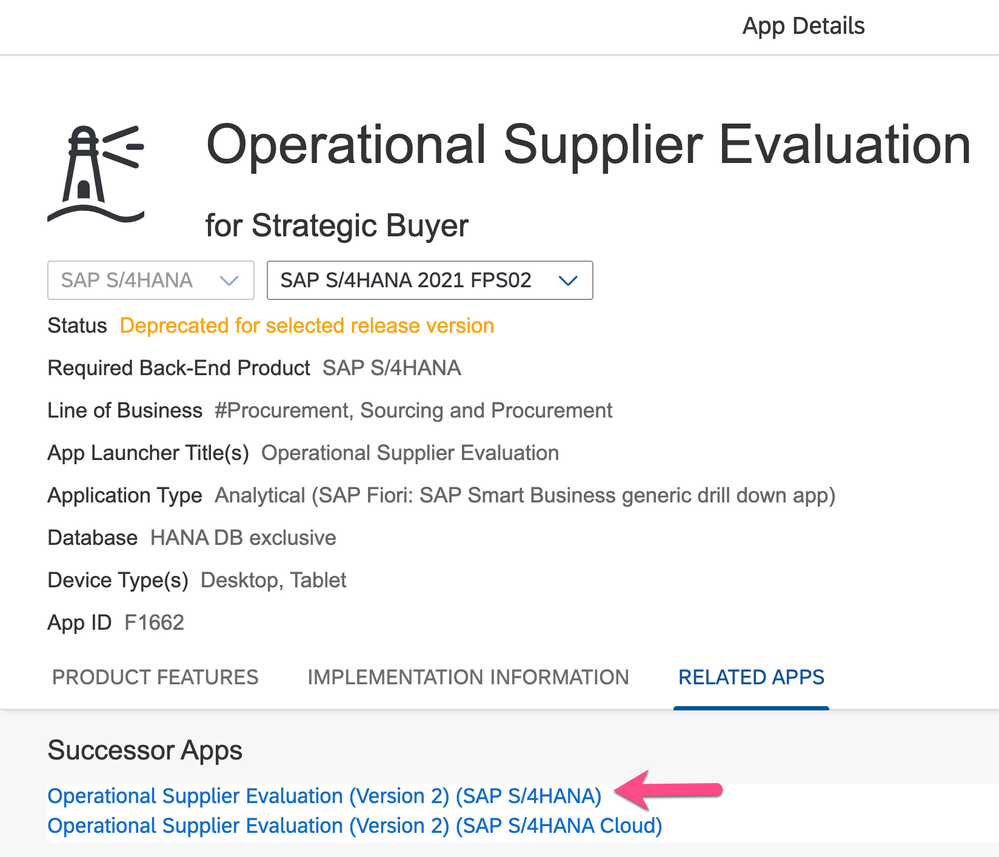
When an app is deprecated, you may see a message “Deprecated for selected release version” as shown below for app F1662 Operational Supplier Evaluation.
When an app is obsolete, you will not be able to select that version. For example, F1662 was made obsolete in SAP S/4HANA 2022. You cannot select the release SAP S/4HANA 2022 for that app.
You can find the successor app listed in the Related Apps tab. For example you can find that the successor app is F1662A Operational Supplier Evaluation (Version 2).
Becoming a SAP Fiori for SAP S/4HANA guru
You’ll find much more on our SAP Fiori for SAP S/4HANA topic page
Other helpful links:
Brought to you by the SAP S/4HANA RIG and Customer Care team.